
SAP Production Planning (PP): How the module turns demand into finished goods


Nội dung chính
- SAP Production Planning (SAP PP) puts demand, materials, capacity, and shop-floor orders in one system.
- The SAP production planning process runs in six steps, from PIRs in Demand Management to confirmed production orders on the shop floor.
- Most MRP problems come from outdated master data, not from the SAP production planning module itself.
- S/4HANA keeps the core logic of SAP PP but makes MRP much faster, as long as production versions and MRP areas are ready before go-live.
An MRP (Material Requirements Planning) run looks clean on screen. In the plant, the numbers tell a different story. Planned orders pile up for materials that are already in stock, a routing still carries setup times from three years ago, MD04 fills with exception messages no one has time to read, and planners quietly rebuild the schedule in Excel. The system keeps planning, but nobody follows the plan anymore.
SAP Production Planning (SAP PP) is built to close that gap by connecting demand, materials, capacity, and shop-floor orders in one flow. Below, I’ll walk through how SAP PP production planning works, from the components of the module and the 6-step planning process to the master data that makes or breaks every MRP run, and how to get it right without adding more noise to the plant.
What is SAP Production Planning (SAP PP)?
SAP Production Planning (SAP PP) is the production planning module in SAP that handles this work inside SAP S/4HANA, whether you run Cloud Public Edition, Private Edition, or on-premise. It’s built to manage production from plan to finished product without relying on separate spreadsheets or manual transfers between teams. Planning, execution, and cost tracking all happen in the same system.
At a practical level, SAP PP covers the full production flow. You set up products with BOMs, routings, and work centers, run MRP to calculate what to make and what to buy, and create production orders for the shop floor. As work moves forward, SAP PP records every goods movement, from raw materials issued to the line to semi-finished and finished goods received into stock. It also tracks planned and actual costs for each order, so finance can see where production ran over or under budget. And because PP shares data with sales, purchasing, and finance, a new sales order can trigger planning, while confirmations and goods receipts update inventory and costs as the work is completed.
That said, SAP PP is not the only SAP tool involved in production. Several other SAP solutions work alongside it, and their names are easy to mix up. Here’s how they differ.
Solution | What it does | Planning level | When you need it |
SAP PP | Core production planning and execution in SAP S/4HANA: MRP, production orders, confirmations, and order costing | Plant level, days to months | Every manufacturer running production in SAP |
Embedded PP/DS | Detailed scheduling and sequencing on limited-capacity machines and lines inside S/4HANA | Plant or line level, hours to weeks | When capacity limits, setup times, or complex sequencing drive your schedule |
SAP IBP | Cloud-based sales and operations planning, demand forecasting, and supply planning across the network | Company or network level, months to years | When you plan across several plants and need one agreed demand plan |
SAP Digital Manufacturing | Cloud-based MES for shop-floor execution: work instructions, machine data, and OEE tracking | Shop-floor level, real time | When you need live machine data, paperless work, or tighter shop-floor control |
Next, I’ll break down the main components of the SAP production planning module, how each one works in a real plant, and where they make the biggest difference.
Inside the SAP PP module: Components and what each one does
The SAP production planning module is made up of two groups of components. Planning components (SOP, demand management, MPS, MRP, and capacity planning) decide what to produce and when. Execution components (production orders, repetitive manufacturing, process orders, and KANBAN) carry that plan out on the shop floor.
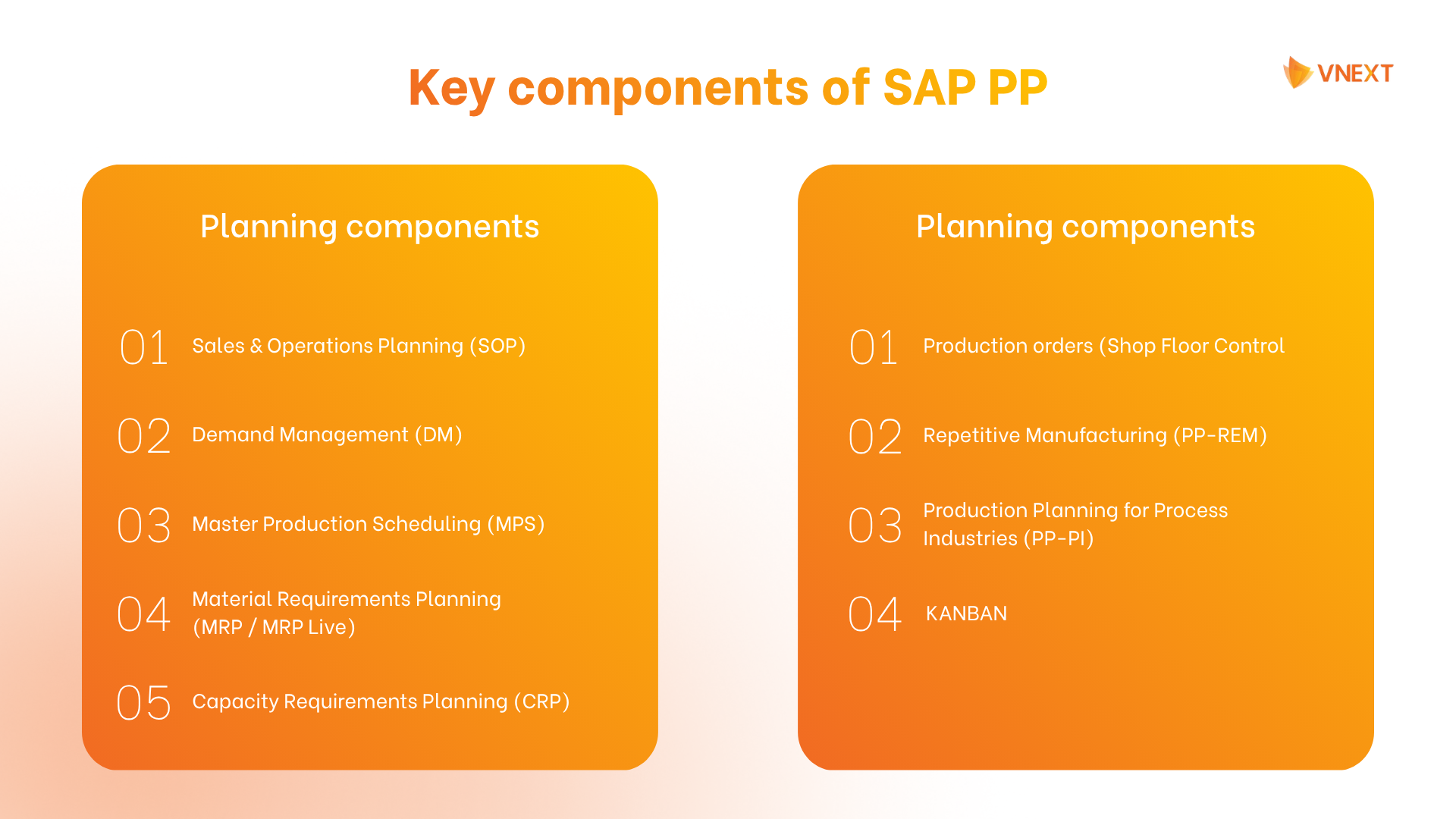
Planning components
Sales & Operations Planning (SOP)
SAP PP supports Sales and Operations Planning (SOP) at the product-group level, so monthly sales forecasts become clear production targets that management can review against plant capacity before detailed planning starts. Once approved, the plan transfers to Demand Management as planned independent requirements (PIRs) for MRP, although in SAP S/4HANA, SOP is part of the compatibility scope, and SAP recommends SAP Integrated Business Planning (IBP) as its successor.
Demand Management (DM)
You can turn sales forecasts into planned independent requirements (PIRs) and combine them with customer requirements from real sales orders. Each product then gets a planning strategy, set through the strategy group in the material master. With make-to-stock, the plant produces goods for stock before any sales order arrives. With make-to-order, production starts only for a specific sales order or order line. For strategies such as planning with final assembly, incoming sales orders consume the matching PIRs instead of being added on top of them, which keeps MRP from planning the same demand twice.
Master Production Scheduling (MPS)
Plan your most important finished goods first, before MRP runs for the rest of your materials. Master Production Scheduling (MPS) uses a planning time fence to firm the near-term plan for these high-value or capacity-heavy items, helping you keep a stable schedule that MRP then uses as the basis for all dependent components.
Material Requirements Planning (MRP / MRP Live)
Material Requirements Planning (MRP) runs a net requirements calculation to find shortages, then creates planned orders for materials made in-house and purchase requisitions for raw materials that need to be bought. It also explodes the BOM level by level, which means every sub-assembly and component gets its own proposal, and uses lead time scheduling to set the start and finish dates for each planned order. In SAP S/4HANA, MRP Live (MD01N) runs these calculations directly on the HANA database, and planners review the results and exception messages in MD04 or the Fiori app Monitor Material Coverage.
Capacity Requirements Planning (CRP)
When MRP runs, it creates capacity requirements for each work center, but it plans as if every work center had unlimited time. Capacity Requirements Planning (CRP) checks those requirements against what each work center can handle and shows where it has too much work. Planners can then use the capacity planning table to move orders to another day or another work center. This gives the plant a production plan that stays within its real limits and helps cut down on late orders.
Execution components
Production orders (Shop Floor Control - Discrete Manufacturing)
You can manage each production order from the moment it is created to the moment its costs are closed. Before the order is released to the shop floor, the system checks whether all components are available. As the work moves forward, each step is recorded in SAP, from the components taken from stock to the time spent on each operation and the finished goods received into the warehouse. Once the order is complete, its costs are settled to Controlling, so Finance can see how much each order cost compared with the original plan.
Repetitive Manufacturing (PP-REM)
Repetitive Manufacturing (PP-REM) is built for plants that make the same products on the same lines every day. It allows planners to set how much to produce in each period on a run schedule. When operators report finished goods, SAP takes the used components out of stock automatically and collects the costs for the whole period in one place, which makes reporting much simpler for busy production lines.
Production Planning for Process Industries (PP-PI)
Recipe- and batch-based production works differently from assembly, but Production Planning for Process Industries (PP-PI) is developed for it. Process orders and master recipes let you plan and run batches in industries such as chemicals, food, or pharmaceuticals, while batch management keeps a full record of every batch, including co-products and by-products, for quality checks and audits.
KANBAN
With KANBAN, an empty container on the line sends a signal in SAP, and the system starts the refill on its own, either from your own production or from a supplier. This keeps a small, steady amount of stock at the line and works best for parts that are used at a regular pace.
The SAP production planning process in 6 steps
The SAP production planning process moves from demand to executable orders in six steps: demand planning, master production scheduling, the MRP run, result evaluation, capacity planning, and order conversion.
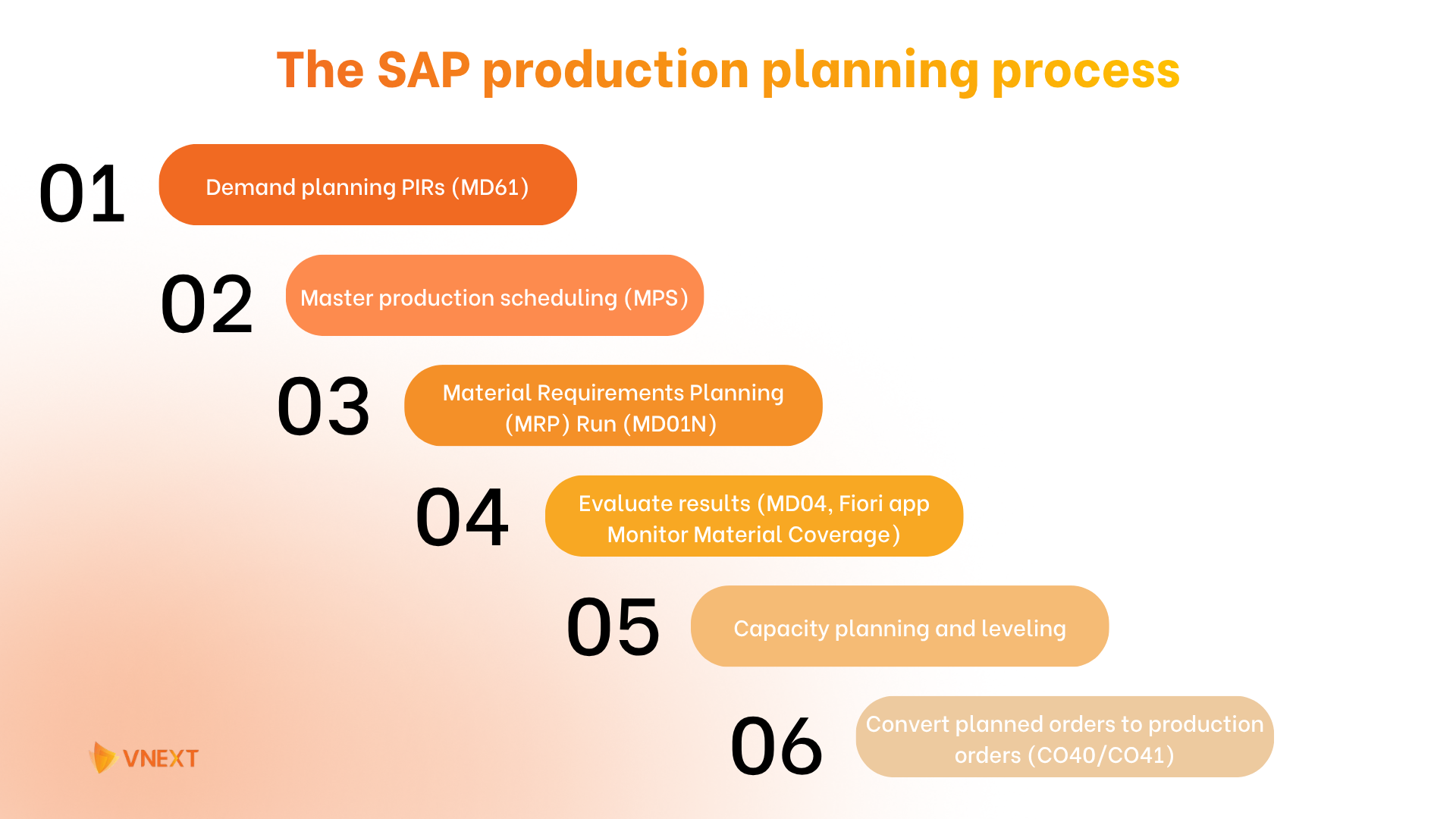
1. Demand planning PIRs (MD61)
The first step in the SAP production planning process is Demand Management, where planners decide how much of each product the plant needs and by when. Sales forecasts can be built from past sales data or brought in from a planning tool such as SAP IBP. Planners then turn these forecasts into planned independent requirements (PIRs), which tell SAP how much of each product to plan for in each period. For make-to-order products, real sales orders take the place of forecasts and go straight into planning. Getting this first step right is important, because every later step, from MRP to purchasing, uses these numbers as its starting point.
Input: Sales forecasts and sales orders
Output: PIRs and customer requirements
T-code / Fiori app: MD61 (create PIRs) / Maintain PIRs
2. Master production scheduling (MPS)
This step covers the products with the biggest effect on revenue or plant capacity, usually high-value finished goods or items that take up a large share of machine time. These materials are flagged with an MPS planning type in the material master, which tells SAP to plan them first and apart from the regular MRP run.
Input: PIRs and sales orders for MPS items
Output: Firmed planned orders for MPS items and requirements for their components
T-code: MD43 (single-item MPS) / MD40 (MPS for the whole plant)
3. Material Requirements Planning (MRP) Run (MD01N)
With key products planned, SAP PP runs Material Requirements Planning (MRP) for the rest of the materials in the plant. MRP first reads the material master, the central record that holds everything SAP knows about a material, such as its material type and lead time. It then combines this data with the BOM and current stock to find which components are missing and when they will be needed. Materials made in-house get planned orders, while materials bought from suppliers get purchase requisitions or schedule lines that already account for vendor lead times and lot sizes.
Input: PIRs, MPS results, material master data, BOMs, and stock levels
Output: Planned orders, purchase requisitions, schedule lines, and exception messages
T-code / Fiori app: MD01N (MRP Live) / Schedule MRP Runs
4. Evaluate results (MD04, Fiori app Monitor Material Coverage)
After the MRP run, the fourth step is to check the plan before anything moves to the shop floor or to suppliers. Planners open the stock/requirements list in MD04, which shows every receipt and requirement for a material, with the stock balance updated line by line. SAP also adds exception messages to point out problems, for example a planned order whose start date is already in the past, or an order that should be moved earlier to meet demand. In the Fiori app Monitor Material Coverage, planners can filter materials with shortages and fix them directly by changing a date or a quantity. Once a planned order looks right, it can be firmed, which stops the next MRP run from changing it.
Input: Planned orders, purchase requisitions, and exception messages from the MRP run
Output: Reviewed and firmed planned orders with corrected dates and quantities
T-code / Fiori app: MD04 (stock/requirements list), MD05 (MRP list) / Monitor Material Coverage
5. Capacity planning and leveling
MRP plans materials as if every work center had unlimited time, which is why the fifth step in SAP PP is capacity planning. Capacity Requirements Planning (CRP) adds up the hours each work center needs for its planned orders and compares that load with the time its shifts can provide. When the load is higher than the available time, planners use capacity leveling to move orders to another period or another work center.
Input: Planned orders with operation times from routings
Output: A production plan that stays within work center capacity
T-code / Fiori app: CM01 (capacity evaluation), CM21 (capacity leveling) / Manage Work Center Capacity
6. Convert planned orders to production orders (CO40/CO41)
The last step turns the plan into real work. Planned orders from MRP are converted into production orders, either one at a time in CO40 or in bulk in CO41. Unlike a planned order, a production order is a firm document that MRP no longer changes. It states which material to produce and in what quantity, and it carries the BOM components and routing operations that each work center needs to perform.
When the order is released, SAP runs a material availability check to show whether any components are missing. As operators complete the work, they confirm the order in SAP. During confirmation, components can be taken from stock automatically through backflushing, and the finished goods can be received into stock automatically if the control key in the routing is set up for it. Machine and labor costs are posted to the order at the same time. After the final confirmation and goods receipt, the order shows the status CNF (confirmed) and DLV (delivered). If a confirmation was entered with wrong data, planners can cancel it and post it again.
Input: reviewed planned orders that have passed capacity planning
Output: confirmed production orders and finished goods in stock
T-code / Fiori app: CO40 / CO41 (convert planned orders), CO02 (release), CO11N (confirmation) / Manage Production Orders, Confirm Production Operation
SAP PP core master data: Why most MRP problems start here?
Most MRP problems start in master data because MRP never checks whether the data is correct. It reads lead times, lot sizes, BOM quantities, and routing times straight from SAP PP master data and uses them to calculate every planned order. When one of these values is wrong, MRP still runs, but the dates and quantities it creates are wrong too.
Most of these errors come from data that was correct once but was never updated after a design change or a new supplier lead time. Five master data objects drive every MRP result and every step of the SAP production planning process: the material master, the BOM, the routing or master recipe, the work center, and the production version. The sections below explain what each one controls and which fields to check first.
- Material master
The material master isthe central record for every material a company buys, makes, stores, or sells. Purchasing, inventory, sales, and production planning all work from this same record, which is also called the product master in SAP S/4HANA Fiori apps. Planners maintain it in MM01 and MM02, or in the Fiori app Manage Product Master Data. For production planning, the most important data is in the MRP views, where you set the MRP type, lot size, procurement type, planned delivery time, and strategy group.
Each material also has a material type and an industry sector. The material type controls how the material is used, with finished products (FERT) made in-house and sold, semi-finished products (HALB) used in higher-level products, and raw materials (ROH) bought from suppliers. The industry sector, such as mechanical engineering or chemical industry, decides which screens and fields appear when the material is created and cannot be changed once the record is saved.
- Bill of Material (BOM)
A bill of materials (BOM) is a structured list of every component needed to make a product, with the quantity and unit of measure for each one. MRP uses it to calculate component requirements, and the same data supports procurement and product costing. A product can have up to 99 alternative BOMs, and products with many variants can use a super BOM, where SAP picks the right component, such as a bicycle frame in a certain color and size, based on the sales order.
Each material in a BOM structure also gets a low-level code. The finished product at the top has code 0, its direct components have code 1, and each lower level takes the next number. MRP plans materials in this order, which makes sure every component is planned only after all demand from the levels above it is known.
- Work center
A work center is the place where production operations are carried out, whether that is a single machine, a group of machines, a production line, or a team of people. In a bakery, it could be an oven or the baking team, while in a car plant, it could be an assembly robot. Routings assign each operation to a work center, and SAP uses the work center data for scheduling, capacity planning, and costing. For example, an oven's work center record shows how many hours it can run each day and how many ovens are available, and it links to a cost center that sets the cost of each hour of use.
- Routing
A routing is the step-by-step recipe for making a product in SAP. It lists the operations in the order they are performed, the work center for each operation, and the setup, machine, and labor time each one needs. A simple routing for a tuna sandwich, for example, could have one operation for assembling the sandwich at the prep table and a second for baking it in the oven for five minutes. SAP uses these times to schedule production orders and to calculate the standard cost of the product. In process manufacturing (PP-PI), the same role is played by the master recipe.
- Production version
A production version links one BOM with one routing and tells SAP which combination to use when a product is made. If a product can be built in more than one way, for example on two different lines or with different components, each method gets its own production version, with its own validity dates and lot size range. In SAP S/4HANA, production versions are mandatory for in-house production, and MRP uses them to select the right BOM and routing when it creates planned orders.
Discrete, Process, and Repetitive manufacturing in SAP PP
SAP PP supports three manufacturing styles, each with its own execution object: production orders for discrete, process orders (PP-PI) for process, and run schedules (PP-REM) for repetitive manufacturing.
Discrete manufacturing | Process manufacturing (PP-PI) | Repetitive manufacturing (PP-REM) | |
Typical industries | Machinery, automotive parts, electronics | Chemicals, pharmaceuticals, food and beverage | Consumer goods, packaging, high-volume components |
Production pattern | Distinct products made in separate orders, often with changing designs | Batch or continuous production based on recipes and formulas | The same products made on the same lines over long periods |
Execution object | Production order | Process order | Run schedule quantities (planned orders) |
Core master data | BOM, routing, work center | BOM, master recipe, resource | BOM, rate routing, production line, production version |
Confirmation | Per operation or order (CO11N) | Per phase or order (COR6N) | Backflush on finished goods (MFBF) |
Batch and co-products | Optional | Built in, with batch management, co-products, and by-products | Limited |
Costing | Order-based costing (settled per production order) | Process order costing (capturing co-products/by-products) | Product cost collectors (period-based aggregates) |
How SAP PP connects with MM, SD, QM, PM, and CO
The SAP production planning module is the link between sales, purchasing, quality, maintenance, and finance in SAP S/4HANA. It takes demand from sales orders in SD and passes its planning results to the other modules through shared documents, such as purchase requisitions in MM, inspection lots in QM, and order settlement in CO. All modules work from the same real-time data, without any manual transfer between teams.
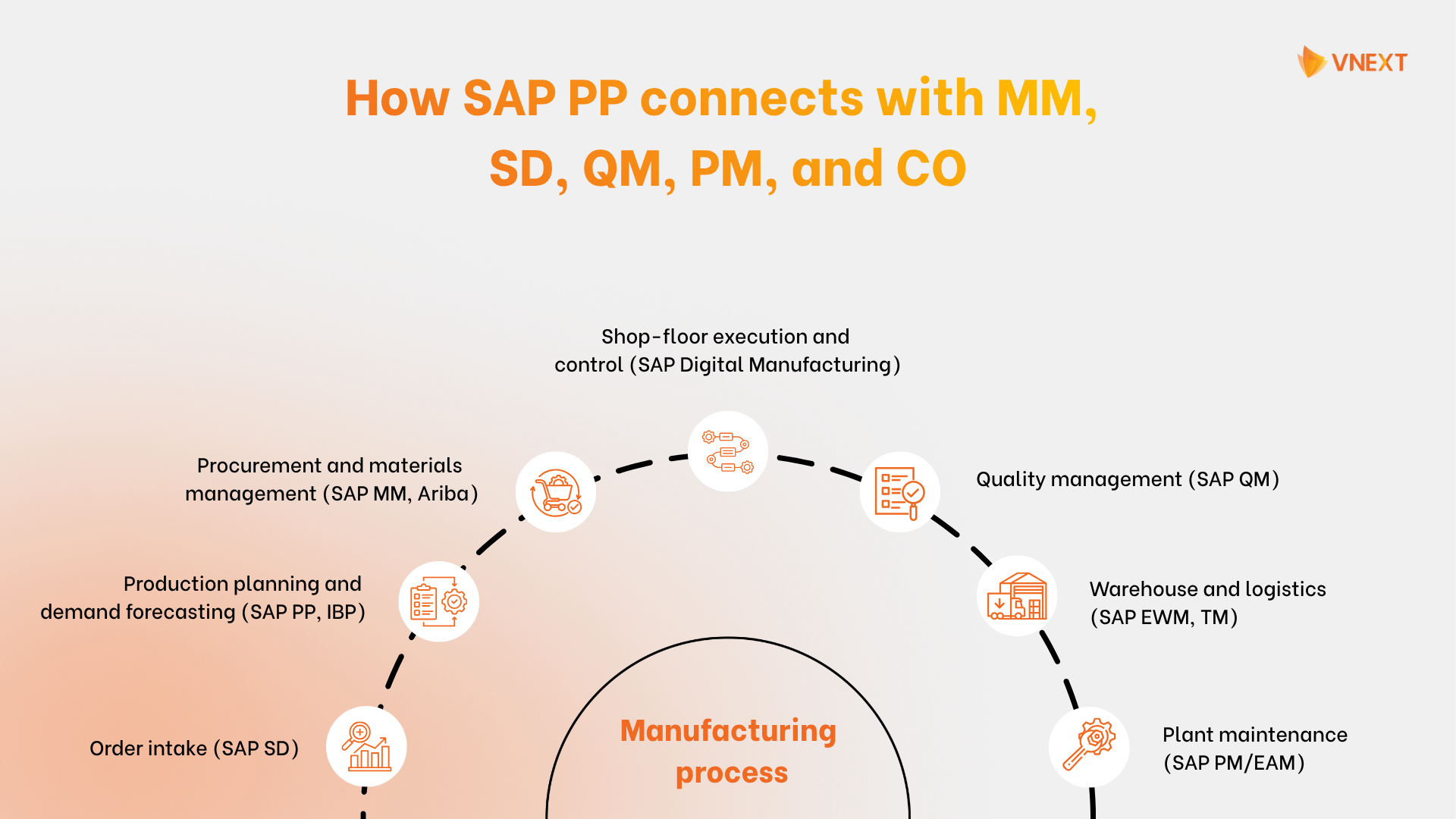
Check out how to choose right SAP modules for your plant.
SAP PP in S/4HANA
SAP S/4HANA keeps the core logic of SAP PP production planning, from demand management and MRP to production orders and confirmations. What changes is how the module runs. Planning now works directly on the SAP HANA in-memory database, which makes MRP much faster and gives planners up-to-date data. The data model is also simpler. Many of the summary tables that SAP ERP (ECC) used for stock and requirements are gone, and reports now read the original records directly. This is what makes embedded analytics possible, with Fiori apps such as Monitor Material Coverage showing shortages and order status as they happen, without a separate reporting system.
Some changes require preparation before go-live. Production versions become mandatory for every in-house produced material, and storage-location MRP is replaced by MRP areas. Plants that skip this work during an ECC to S/4HANA migration usually find out on the first MRP run. With ECC mainstream support ending in 2027, it is worth reviewing these changes early, starting with the comparison below.
Area | SAP ECC | SAP S/4HANA | What planners gain with S/4HANA |
MRP run | Classic MRP (MD01) runs on the application server and reads data in many separate steps, which makes plant-wide runs slow | MRP Live (MD01N) runs the calculation directly inside the SAP HANA database | Plant-wide runs finish in minutes, and planners can rerun MRP during the day whenever demand or supply changes |
Planning by storage location | Storage-location MRP, set per material with limited options | MRP areas for plants, storage locations, and subcontractors | One consistent method for planning separate stock areas, with its own lot sizes and planning settings for each area |
Production version | Optional, as SAP could pick the BOM and routing through other selection rules | Mandatory for in-house production | Every order uses a clearly defined BOM and routing combination, which reduces errors in both planning and costing |
Detailed scheduling | PP/DS in a separate SAP APO system, connected to ERP through an interface | Embedded PP/DS inside S/4HANA | Detailed scheduling uses the same live data as MRP, with no second system to run and no interface to monitor |
User interface | SAP GUI with transaction codes, with the same screens for every user | SAP Fiori role-based apps on desktop, tablet, or mobile, with SAP GUI still available | Each planner sees the tasks and alerts for their own role, such as shortages in Monitor Material Coverage, and can act on them in a few clicks |
Sales and operations planning | SOP inside ERP, based on product groups and basic forecasting | SAP IBP as the recommended successor, with SOP in the compatibility scope | Advanced forecasting and what-if scenarios across plants, with the agreed plan passed to S/4HANA as the basis for MRP |
Learn more about how SAP transforms processes in manufacturing
Why choose VNEXT for implementing SAP PP
SAP production planning rarely stays inside one module. It depends on clean data in MM, sales orders from SD, and costing in CO, which is why your team needs a partner who understands how these modules work together. VNEXT is an SAP PartnerEdge Service Partner with consultants and ABAP engineers across PP, MM, SD, FI/CO, PS, and SAP BTP, and with SAP certifications in S/4HANA Cloud implementation, SAP Activate, SAP Fiori, and ABAP Cloud development. With 20 years of experience, 30+ SAP systems delivered, and ISO 9001 and ISO 27001 certifications, our team has supported Japanese manufacturers with long-term PP, MM, SD, and FI/CO add-on work.
For manufacturers, confirmations and stock changes need to reach planning and finance without delay. SAP PP makes this possible, but the result depends on the quality of your master data and how you plan the rollout. If you are setting up the production planning module in SAP for the first time, implementing SAP for your factory or moving from SAP ECC to S/4HANA before the 2027 deadline, VNEXT’s SAP consultants can review your current planning setup and master data, then help you plan the scope and next implementation steps.

Có thể bạn quan tâm
-
 Enterprise Software & DX SAP/ERP
SAP implementation in manufacturing: What consultants wish you knew before kickoff
SAP implementation in the manufacturing industry is the process of setting up and tailoring SAP to run a factory’s core operations, covering process design, master data preparation, shop-floor integration, and user training. It usually follows the SAP Activate methodology and runs from a few months to a few years, depending on project scope. According to Panorama Consulting’s ERP Report, a large share of ERP projects run over budget or past schedule, and the cause is rarely the software. Far more often, it is due to poor data quality, weak change management, and a rushed approach. In manufacturing, this plays out in familiar ways: teams begin an SAP implementation without a clear plan for their data, processes, and workforce, then hit problems like messy master data, outdated custom code, and workflows that don’t match the plant production. The better path is a well-planned SAP implementation that covers everything from early discovery and data cleanup to go-live and long-term support. In this guide, I’ll cover what makes SAP implementation in manufacturing succeed, from the early decisions that shape the outcome to the practical steps that keep delivery on schedule. What SAP manufacturing implementation really involves SAP manufacturing implementation is more than installing one piece of software. It is the work of shaping SAP to run a factory end to end. In practice, a project pulls together six key parts: Process design: mapping your production, procurement, quality, and finance processes against SAP best practices, and deciding where to standardize and where to adjust. Master data preparation: cleaning and aligning BOMs, routings, work centers, material records, and vendor data. Configuration: setting up core modules like PP, MM, SD, QM, PM, and FICO to match your plant. Shop-floor integration: connecting SAP with MES, IoT devices, machines, and product lifecycle management (PLM). Data migration and testing: moving data from legacy systems and validating real scenarios such as plan-to-produce and order-to-cash. Training and support: preparing planners, operators, and quality and finance teams, then supporting the system after go-live with AMS and ongoing optimization. Not every SAP implementation in manufacturing starts from the same place. A new implementation (Greenfield) builds SAP from scratch for a plant that is new to SAP or wants a clean start, while an ECC migration moves an existing SAP ECC system to S/4HANA, carrying over data, processes, and custom code. The two follow different paths and timelines, so knowing which one you are facing defines the whole project. If you are moving off ECC before the 2027 deadline, see our full guide to SAP ECC to S/4HANA migration for manufacturing. Is your plant ready for SAP implementation? A quick readiness checklist Before committing to an SAP implementation, it is worth checking whether the right conditions for a smooth rollout are available, since a project that starts on a weak foundation is not likely to end well. Five things should be ready before the build begins: clean master data, clear process mapping, a defined project scope, a review of existing systems, and a plan for your people. The checklist below walks through each one. 1. You have clean master data An SAP system is only as reliable as the data it runs on. Whether you are planning a full SAP implementation or an ECC migration, the quality of your master data decides how far the system can go. Reviewing your data readiness before scoping the build reduces rework and de-risks the delivery timeline. In practice, that means your master data should be: Stored in a form SAP can use, without heavy manual cleanup later; Consistent in format and structure across plants and sources; Current enough to reflect how your plant produces day to day; Complete, covering the BOMs, routings, work centers, material records, and vendor data each module needs; Free of duplicates and outdated records that spread errors into a fresh system. 2. You have mapped your processes An SAP project works best when it is tailored to your factory’s operational processes. Manufacturers that enter implementation with their current processes clearly mapped, from order intake to shipping, move significantly faster than those who start configuring and work backward. Detail beats assumption here. A clear picture of your real workflows, including the manual steps and the gaps where data gets lost, is far easier to fit to SAP and to scope accurately. Your teams don’t need to have fixed every process first, but they do need to agree on everyday workflow. 3. You have a defined project scope An SAP project needs a clear specification from the start, one that defines which modules and plants go first, what counts as “done,” and where the boundaries are before configuring. Manufacturers that treat scope as an open-ended target tend to see timelines slip and costs grow as new requirements keep coming in. Before starting an implementation, confirm that the scope is written down and agreed on by both your team and your SAP partner. 4. Your systems can support integration SAP needs to connect with the other tools you use, both on the floor and in the back office, such as MES, PLM, warehouse systems, machines, and older software. Before you start an SAP implementation, check that these systems can share data with SAP through clear connection points like APIs or data exports. Getting this right helps you avoid one of the most common causes of delay in a manufacturing rollout. Signs your integration layer is ready: Core systems have documented APIs or accessible data exports; Data ownership and access permissions are clearly defined; IT and shop-floor teams are available to support integration work; Security and compliance requirements for data sharing are understood. If your current setup needs significant rework before SAP can connect, build that work into the implementation plan early. 5. You have a plan for your team Before starting, confirm that your plant has a plan for the people who will use SAP every day: planners, operators, and quality and finance teams. That means naming process owners, preparing training early, and explaining what changes in daily work before go-live. [[CTA_BANNER text="Get your factory SAP-ready and turn everyday data into faster decisions." btn="Reach out to VNEXT"]] Choosing your SAP deployment model Manufacturers can run SAP S/4HANA in three ways, and the right choice depends on how much control, flexibility, and customization your plant needs. The table below compares the three deployment options: SAP S/4HANA Cloud Public Edition, SAP S/4HANA Cloud Private Edition & SAP S/4HANA On-Premise. Criteria SAP S/4HANA Cloud Public Edition (GROW with SAP) SAP S/4HANA Cloud Private Edition (RISE with SAP) On-Premise Model A shared SaaS model fully managed by SAP A dedicated cloud with more flexibility, managed by SAP Infrastructure owned and run by the manufacturer Infrastructure and operations SAP manages the full technical environment SAP manages the infrastructure, with more control on your side Your team handles infrastructure, security, backups, and operations Customization Follows Clean Core; extensions through SAP BTP only More room for complex needs and legacy code, Clean Core still advised Deepest control over system and custom code Upgrades SAP applies regular updates automatically You control upgrade timing within SAP’s lifecycle You fully manage upgrade planning and timing Best for Manufacturers standardizing processes, going live fresh, or scaling fast Large manufacturers moving off SAP ECC with complex legacy systems Plants needing full control over infrastructure, security, or strict compliance Key manufacturing design decisions to make before you implement An SAP implementation involves fitting SAP’s modules to plant production. The biggest strength is the ability to standardize processes, connect the shop floor to the back office, and run production on real-time data. But moving from strategy to a working system means making a few key design decisions, as listed below: Production planning: standard MRP Live or embedded PP/DS? For simpler plants, MRP Live handles material planning fast on live data. For complex scheduling with many product variants, embedded PP/DS gives you finer control. Picking the right level early helps you avoid both over-engineering and under-planning. Warehouse: inventory management, embedded EWM, or decentralized EWM? Basic inventory management covers simple stock handling. Embedded EWM suits plants that need bin-level control inside S/4HANA. Decentralized EWM fits high-volume, complex warehouses that run on their own. Quality and traceability: how deep should QM and batch management go? Some plants only need basic inspections, while regulated industries like food and pharmaceuticals need full batch traceability and product history. Deciding how far QM and batch management should reach early keeps you compliant without adding effort you don’t need. Shop-floor execution: S/4HANA production orders, SAP Digital Manufacturing, or a third-party MES? Simple operations can run on S/4HANA production orders alone. Plants that need real-time machine data, paperless work, and OEE tracking get more from SAP Digital Manufacturing. Some keep an existing third-party MES. Making these decisions before the build begins keeps an SAP implementation on scope and on budget. An experienced partner can help you pick each one based on your production type, volume, and long-term goals. “Honestly, I get why a lot of manufacturers feel nervous before an SAP project. It feels big. But most of what goes wrong comes down to a few early choices, your data, your scope, who owns what. Sort those out first, and the whole thing gets a lot less scary. That’s the part we love helping teams with.” Long Ho - SAP Expert 6 SAP implementation phases in manufacturing (SAP Activate) SAP recommends a six-phase approach called SAP Activate: discover, prepare, explore, realize, deploy, and run. The phases are the same across industries, but in a factory each one carries manufacturing-specific work that a generic rollout often misses. Here is what each phase looks like on the plant floor. Discover The “Discover" phase is where you evaluate the level SAP fits your plant and decide on the deployment option, whether that is RISE with SAP, public cloud, or on-premises. On the factory side, this stage reviews your current production, quality, and maintenance processes and, for the many plants still on SAP ECC, weighs migration options ahead of the 2027 support deadline. Key deliverables: A high-level implementation roadmap A defined scope of SAP modules to implement (such as PP, MM, SD, QM, PM, and FICO) Access to a trial environment to test SAP Fiori and key features Prepare Once the direction is set, the preparation phase moves into practical detail: setting the rules and responsibilities for the project team, building the technical environment, and getting everyone aligned. This is also where master data work should begin, since BOMs, routings, work centers, and material records take time to clean up. Poor data quality is one of the leading reasons ERP projects run late, so starting early here protects the whole timeline. The project manager works closely with department heads, IT, and shop-floor leads to get the plant ready for what is coming. Key deliverables: A project charter with goals, roles, and responsibilities A detailed project plan and timeline An initial system technical setup A master data cleanup and migration plan A change management plan and kickoff materials Explore Through fit-to-standard workshops, your teams see how standard SAP processes run and identify the gaps between them and your current production processes. Key manufacturing design decisions get settled here too, such as MRP Live versus embedded PP/DS, or embedded versus decentralized EWM, with any gaps added to the project backlog. Key deliverables: A fit-to-standard assessment A project backlog with gaps, technical requirements, and extensions Confirmed process documentation for production, quality, and logistics A solution scope sign-off A financial business case with ROI and TCO Realize In this phase, the project team configures the core modules (PP, MM, SD, QM, PM, FICO) to fit your production processes, develops any custom extensions, migrates master data, and connects SAP to your MES, machines, and other systems. The work runs in sprints, and every work item is tested with real production scenarios like plan-to-produce and order-to-cash before it reaches the floor. Key deliverables: A fully configured system Completed and tested custom developments and integrations Migrated and validated master data Documentation with test scripts and results User training guides and materials Deploy The deploy phase is the final move to the live system, covering final data migration, system checks, and user training. Timing is the biggest concern at this point because the cost is real. According to the Siemens True Cost of Downtime 2024 report, unplanned downtime averages around $260,000 per hour across large manufacturers, and reaches $2.3 million per hour in automotive. A well-planned cutover keeps that disruption to a minimum. Key deliverables: A final cutover plan built around production schedules Completed training for planners, operators, and quality and finance teams A fully live production system Run With the system live, the focus shifts to keeping it stable and making it better over time. In the first few weeks, your partner should run hypercare support to catch and fix issues before they hit production. Once things settle, the plant can start adding newer tools like predictive maintenance, built-in analytics, and AI with SAP Joule. Key deliverables: Hypercare support for a short period after go-live A formal operational readiness review A continuous improvement plan A post-implementation review and benefits tracking Learn more about 6 phases to master the SAP development process for modern enterprises How long does SAP implementation take in manufacturing? Most SAP implementations in the manufacturing industry take between 6 and 18 months, though the exact timeline depends on your deployment model, the number of plants, the degree of customization, and the state of your data. A straightforward public cloud rollout can go live in a few months, while a large, multi-plant project with heavy customization can run well past a year, often 18 to 36 months. Several factors push a manufacturing project toward the longer end of these ranges. Multiple plants or countries bring added localization and phased rollouts, or heavy custom code from an old SAP ECC system takes time to review and clean up. With SAP ECC support ending in 2027, and Gartner projecting that over 75% of SAP ECC customers will have started or completed their migration by 2027, starting early is the surest way to avoid a rushed project and a longer timeline. How much does SAP implementation cost for manufacturers? For manufacturers, SAP manufacturing implementation cost is driven by a few plant-specific factors: the number of plants, how much custom code carries over from an old SAP ECC system, the state of your master data (BOMs, routings, material records), and the integrations needed with MES, machines, and legacy tools. SAP does not publish fixed pricing for S/4HANA, so the figure depends heavily on your setup. The cost usually breaks down into three parts: Software licensing: priced per user per month for cloud editions, or as a perpetual license plus annual maintenance for on-premise. Implementation services: usually the largest part of the budget, covering consulting, configuration, data migration, integration, and testing. Ongoing costs: support, cloud hosting, and future upgrades. Because SAP pricing is quote-based, the only reliable number comes from a scoped estimate by SAP or a certified implementation partner, built around your production type, module mix, and number of sites. Conclusion: What a well-planned SAP project delivers When an SAP implementation is done right, the results show up fast. A Forrester Total Economic Impact study of SAP S/4HANA Cloud found a 155% ROI, $4.8 million in benefits, and a 9-month payback for the organizations studied. Pretty significant for one system. Sure, I can’t promise you’ll see the exact same numbers. Those results came from specific companies, and the details matter, at least not before we review your scope. The point still stands. When SAP is built on clean data, the right modules, and teams that are ready to use it, production runs smoother, decisions get faster, and the investment pays for itself. If you want to check whether your plant is ready for SAP, we’ll walk you through what an implementation really involves, share our SAP solutions for manufacturing, review your processes and data, and help you design a rollout that fits your production setup, well before the 2027 ECC deadline forces the timing.
-
 Enterprise Software & DX SAP/ERP
Top 7 SAP implementation partners for manufacturing in Vietnam (2027)
Let's not sugarcoat it: plenty of SAP implementation partners talk a good game but struggle once the project reaches the shop floor. In manufacturing, there is no room for error. A weak rollout shows up fast on the floor, where production slows, planning breaks down, and finance loses trust in the numbers. After working on SAP projects for manufacturers across Japan, Vietnam and the wider APAC region, we've seen the partners that get it right and the ones that don't. Choosing among the many SAP implementation companies is not easy, since each one offers a different mix of services. For a manufacturer, the stakes are higher, because the right partner needs to understand production planning, quality management, and multi-plant data, not just the SAP software itself. And with SAP ECC support ending in 2027, more manufacturers now need a partner to guide their move to S/4HANA. In this list, I'm highlighting the SAP implementation partners that have consistently delivered for manufacturing clients in Vietnam, from full S/4HANA projects to ECC migration and long-term plant support. Start with your goals before choosing a partner As of October 2026, SAP’s official partner directory shows 32 SAP consulting and implementation partners in Vietnam, among a global network of more than 2,700 vendors. Their services range from solution consulting and implementation to custom development and outsourced application management. With so many options offering SAP implementation in the manufacturing industry, how do you find the one that fits your plant? The answer depends on your own needs, since every manufacturer works with different goals, industry rules, budgets, and existing systems. Some manufacturers only need to link SAP with a third-party platform, while others are planning custom development or a full S/4HANA migration, and each of these calls for a different type of partner. For a factory, the right partner should cover every stage of SAP, from consulting and custom development to rollout, cloud services, application management, and integration, and know the core manufacturing modules such as PP, MM, SD, and FICO. Just as important, they should work closely with your team and stay within your budget. Putting in this research early is the best way to pick the right partner among Vietnam’s SAP implementation companies. Read more: Top 10 IT outsourcing companies in Vietnam Our method of choosing SAP implementation partners for manufacturing in Vietnam Turning a long list of SAP manufacturing partners into a short list of dependable ones takes a clear set of standards, and that matters even more in manufacturing, where a poor choice can slow down production instead of improving it. Below are the factors we consider when listing the partners in this guide, and the same ones can help you run your own search. Track record. We favor companies with proven case studies, usually a decade or more in the market, plus real projects that match yours in size and complexity. A partner who has already delivered SAP in the manufacturing industry is far less likely to run into trouble on your project. Manufacturing know-how. Implementing SAP in a plant is a different job from running it in a bank or a shop. We give priority to partners who grasp production planning, quality control, and multi-site operations, and who work confidently with core modules like PP, MM, SD, and FICO. Flexible ways of working. No two projects look alike, so we lean toward partners who offer several engagement models, from dedicated team, staff augmentation and full implementation to custom development and ongoing support. The strongest ones behave like long-term allies and stay involved well after go-live. Solid reputation. We review client references, ratings, and case studies, and give extra credit to partners with proven wins in manufacturing and clear evidence to back them up. Open communication and pricing. Unclear costs and loose timelines are what derail most SAP projects. We look for partners who are honest about scope, price, and schedule from the start, so nothing catches you off guard once work begins. With these criteria in mind, we have put together a list of the top 7 SAP implementation partners for manufacturing in Vietnam, each able to deliver a broad range of SAP services for factories. Top 7 SAP manufacturing implementation partners in Vietnam 1. VNEXT SOFTWARE Why they’re a top pick: VNEXT is one of the names that keeps coming up when manufacturers in Japan, Korea, Vietnam, and APAC look for a reliable SAP partner, and for good reason. As an SAP PartnerEdge Service Partner with ISO 9001 and ISO 27001 certifications, they have the credentials to back up the work. What really sets them apart is their ability to take tough manufacturing challenges, like production planning across multiple plants, quality management, or an ECC to S/4HANA migration, and turn them into working systems that match the way a factory operates. What stands out about VNEXT is how they work. They are not consultants who hand over a solution and walk away; they stay with you, working alongside your team from discovery through go-live and long-term support. With ~20 years on the market, 30+ SAP projects delivered, and a team of 70+ SAP engineers (several holding JLPT N1 Japanese certification), they know how to tailor SAP across core modules like PP, MM, SD, QM, PM, and FICO to meet the strict quality standards that manufacturing clients, especially in Japan and APAC, expect. Serving location: Japan, Vietnam, Korea, and the wider APAC region Key focus areas: SAP S/4HANA implementation, SAP ECC to S/4HANA migration, SAP system integration, core manufacturing modules (PP, MM, SD, QM, PM, FICO), ABAP and Fiori development, SAP public cloud, SAP BTP, SAP Business AI [[CTA_BANNER text="Give your factory an SAP partner that stays for the long haul." btn="Reach out to VNEXT"]] 2. FPT IS Why they’re top: FPT IS, the system integration arm of FPT Corporation, pairs the scale of one of Vietnam’s largest IT firms with a deep SAP practice built over years of enterprise work. Named SAP’s best partner in Vietnam for six consecutive years, they bring the resources and track record that large, complex projects demand, with 200+ delivered projects and a bench of 1,000+ ERP specialists. Their reach runs the full lifecycle, from consulting and business process review through implementation, data migration, integration, and long-term support, which suits manufacturers planning a major move such as an ECC to S/4HANA transformation or a multi-site rollout. FPT IS works across many sectors, and industrial manufacturing is one of them, backed by real projects with Vietnamese manufacturers. Their expertise covers: SAP S/4HANA implementation: delivering full S/4HANA Public Cloud and on-premise projects, as seen with manufacturers like EEMC (power transformers), Phu Tai Quartz, and AA Corporation (furniture), helping them standardize processes and lift productivity. System and shop-floor integration: connecting SAP with MES, IoT and SCADA, SCM, PLM, and analytics, so production data flows from the floor to the core. Localization and compliance: as SAP’s first e-invoice integration partner in Vietnam, adapting SAP to local tax and reporting rules that manufacturers must meet. Serving location: Vietnam, Japan, with delivery across global markets Key focus areas: SAP S/4HANA implementation and migration, system integration (MES, IoT, SCM, PLM), SAP cloud ERP, SAP Business AI, data analytics, and application management. 3. CMC Consulting Why they're top: As a full digital transformation partner, CMC Consulting stays involved throughout the project, which helps them understand your goals and how your plant runs. Part of CMC Corporation, one of Vietnam's largest technology groups, they combine solid SAP expertise with a wider consulting practice, so they can build transformation roadmaps that link your ERP to bigger goals like smart factory and Business AI. CMC Consulting also handles complex, data-heavy work across industries, and manufacturing stands out through their SAP and Smart Factory solutions. The systems they deliver bring production, planning, and data onto one platform, helping manufacturers standardize processes and make better use of real-time information. For a manufacturer looking to move from a straightforward SAP implementation toward AI-driven operations, CMC Consulting is a strong partner to consider. Serving location: Vietnam and the Asian market Key focus areas: SAP implementation, SAP ERP for SMEs, Smart Factory solutions, Data and Business AI transformation, and digital transformation consulting. 4. Viettel Solutions Why they’re top: As part of Viettel Group, Vietnam’s largest telecom and technology company, Viettel Solutions brings the scale and infrastructure that few local partners can match, which lets them handle everything from SAP Business One for smaller plants to SAP S/4HANA for large, complex manufacturers. The main distinction of Viettel Solutions from its competitors lies in how it works with the market. Rather than acting as a pure reseller, they respond to real demand by developing their own industry-specific packages, so manufacturers get a solution shaped around their sector. The team supports the full journey, from SAP ERP integration consulting and cloud deployment to add-on development and ongoing system monitoring, backed by Viettel’s own IT infrastructure. Their expertise covers SAP ERP (SAP Business One and SAP S/4HANA), cloud solutions such as SAP SuccessFactors and SAP Analytics Cloud, and custom add-on development. For a manufacturer that wants a well-resourced Vietnamese partner with both SAP skills and strong infrastructure behind it, Viettel Solutions is a solid choice. Serving location: Vietnam, with wider global markets Key focus areas: SAP ERP integration consulting (SAP Business One, SAP S/4HANA), SAP cloud solutions (SuccessFactors, Analytics Cloud), add-on development, and IT infrastructure deployment 5. CITEK Why they’re top: Citek is an SAP Platinum Partner and a member of United VARs, the global alliance of SAP partners, with 110+ clients across 13+ countries and a proven track record in SAP consulting and implementation in Vietnam. As a multi-award-winning partner, named Best GROW Partner and Best Midmarket Partner at the SAP SEA Partner Summit 2025, Citek delivers production-ready SAP solutions for both large corporations and SMEs, with a clear focus on industry fit, optimized operations, and real business results. They work with leading manufacturers such as Hoa Phat, CADIVI, GELEX Electric, UNIBEN, and FRIWO, helping them move from legacy systems to mature SAP S/4HANA landscapes. Their practical, industry-specific approach, backed by 40+ proprietary solutions, lets manufacturing clients gain a competitive edge by bringing production, planning, and analytics onto one platform, including advanced capabilities like PP/DS and EWM. With deep experience in industrial manufacturing and related sectors, Citek is recognized for delivering SAP projects that are accurate, well-localized for Vietnam, and built to scale, covering implementation, consulting, localization, upgrades, maintenance, and IoT. Serving location: Vietnam, with delivery across 13+ countries (Germany, Japan, etc...) Key focus areas: SAP S/4HANA implementation, SAP ERP consulting, localization, SAP ERP audits and health checks, upgrades and technical services, SAP maintenance and support, and IoT solutions 6. Sotatek Why they’re top: SotaTek delivers SAP solutions that fit smoothly into existing business systems. They handle full-cycle work, from SAP implementation and S/4HANA migration to custom development, and back it with 24/7 application management and defined SLAs that keep systems stable and downtime low. With 60+ SAP engineers, 30+ personal certifications, and a 95% on-time delivery rate across 25+ countries, SotaTek brings proven delivery to manufacturing and other sectors. Their functional depth covers the modules a factory relies on, including FI/CO, MM, SD, PP, PM, and QM, backed by ABAP, Fiori, and SAP BTP development for integration with MES and other systems. If you want a Vietnamese partner to implement, migrate, or maintain SAP at scale, with flexible engagement models and a focus on cost efficiency, SotaTek is a strong option. Serving location: Vietnam, Japan, Korea with delivery across 25+ countries Key focus areas: SAP implementation (S/4HANA, Business One, ECC), ECC to S/4HANA migration and upgrades, application management services (AMS), custom development and integration (ABAP, Fiori, BTP), and SAP consulting. 7. VTI Solutions Why they’re top: VTI brings SAP into the bigger picture of digital transformation, covering the full path from consulting and strategy to implementation, customization, migration, and long-term maintenance. Working side by side with client teams, they shape each SAP solution to match real business goals and keep it scalable as operations grow, a fit for manufacturers that want both a smooth rollout and steady support afterward. In manufacturing, VTI puts the focus on uptime, with maintenance and support that keep production lines running and IT breakdowns from slowing the floor. Their experience extends beyond the factory into banking and finance, retail and e-commerce, and petroleum, and their IT outsourcing model lets manufacturers scale SAP support by module, time, or project as needs change. For a manufacturer that sees SAP as a driver of transformation rather than just a system to install, VTI is a practical, results-focused partner worth a look. Serving location: Vietnam, Japan, Korea and global worldwide Key focus areas: SAP consulting, implementation and customization, S/4HANA migration, maintenance and monitoring, and data analytics How to choose the right SAP implementation partner in the manufacturing industry? Choosing the right SAP manufacturing implementation partner is a major decision for any manufacturer. You are looking for a partner who can modernize your operations, solve real production problems, and deliver results that show up on the floor. Here is a straightforward guide to help you make that decision. Clarify your goals before you reach out Before even reaching out to SAP partners, be clear about what you want to achieve. Are you planning a full S/4HANA migration, connecting SAP to your MES, or tightening quality control across your plants? A partner with experience in your specific goal will be more effective than one with a broad, general approach. So, make sure your needs are well-defined, and communicate them clearly from the get-go. I would say the clearer you are, the easier it will be to find the right partner. Look for manufacturing expertise, not just SAP expertise Industry experience is more important than you think. I've seen too many manufacturers select a partner because they're "top-rated" in IT outsourcing, only to realize the consultants don't fully understand how a factory operates. A partner with deep manufacturing knowledge will understand the specific challenges, compliance requirements, and production realities you face, from quality and batch traceability to multi-plant operations, and will work confidently with core modules like PP, MM, SD, and FICO. So, find a partner who has delivered SAP for plants like yours. Check for proven results in real factories Don’t get swayed by theoretical knowledge. Ask for concrete examples of how their SAP projects have delivered measurable results for manufacturers like you, such as shorter lead times, lower inventory, or less unplanned downtime. Look for partners that can point to successful outcomes, whether it’s improved efficiency, better quality, or cost savings. Don’t just take their word for it. If they can’t show you results that align with your goals, they’re probably not the right fit. Make sure they understand your operations The best SAP solutions are the ones that fit smoothly with your existing workflows and teams. Make sure the partner takes the time to understand your production operations, not just your tech stack. Ask how they’ll make SAP work with your current systems, such as MES, PLM, or legacy tools, and how they plan to minimize disruption to the shop floor during the move. Prioritize communication and long-term support An SAP project can be a long-term commitment, so the partner you choose needs to communicate clearly, keep you updated regularly, and stay involved throughout. You don't want to be left guessing or chasing them for updates. Ask about their communication style, their reporting, and how they handle support after go-live, including AMS and ongoing optimization. Understand their approach to customization and Clean Core A one-size-fits-all approach rarely works in manufacturing. Make sure the partner you choose tailors its solution to your specific needs, while keeping the core clean so future upgrades stay simple. Ask how flexible their setup is, especially as your business evolves. Can they adapt the SAP system to your changing requirements over time, and build extensions on SAP BTP so they don't complicate the core? Get clear on budget and pricing SAP projects can get costly, but unexpected expenses can turn them into a financial burden. Be clear about your budget and make sure the partner is upfront about pricing. Get a breakdown of costs, including any extra charges for data migration, testing, maintenance, or scaling the system in the future. An honest, transparent cost structure will save you from surprises down the road. If the partner's pricing isn't clear upfront, then decline. Hidden costs are a red flag. A good partner will make sure you understand the full financial picture before starting. Check the team’s expertise and availability SAP projects are highly technical, and you want a partner that brings top-tier talent to the table. Look beyond the sales pitch. Make sure you're getting the best people for the job. Ask about the certifications and manufacturing experience of the actual team members who'll be working on your project. Their experience matters. Also, consider their availability. Will they have the resources to handle your project in the timeline you expect, especially as the 2027 ECC deadline pulls SAP consultants into short supply? Wrapping up When it comes to selecting the right SAP partner for your factory, find someone who gets your business, your production goals, and the challenges you face on the floor. Make sure what they deliver works for you and scales as your operation grows. There are partners out there, like VNEXT, that really know how to take an SAP project from start to finish, from consulting and implementation to ECC migration and long-term support, making sure everything clicks along the way. So, as you consider your options, think about who will be there for the long haul, helping you stay ahead as your business and your SAP needs evolve, especially with the 2027 deadline drawing near.
-
 Enterprise Software & DX SAP/ERP
SAP ECC to S/4HANA migration for manufacturing: How to prepare your plant before the 2027 deadline
For more than 20 years, SAP ERP Central Component (SAP ECC) has been the ERP backbone for more than 35,000 businesses worldwide as of 2024, many of them manufacturers running their plants on it every day. That is about to change. SAP has scheduled the end of mainstream support for SAP ECC on December 31, 2027, after which security patches, compliance updates, and fixes all stop, unless you pay for extended maintenance, which costs 2 to 3 times more and only buys time until 2030. For an ISO-certified plant, running an unpatched core system is a serious compliance and security risk. Some may see the 2027 deadline as still far off. But migration takes time: the average SAP ECC to S/4HANA project runs around 1.5 years, and the pool of experienced SAP consultants keeps shrinking as more companies move toward the same deadline. The numbers show how slow the transition has been. According to the DSAG 2026 investment report, only 37% of companies still on SAP ECC expect to be live on S/4HANA by the end of 2027, while about half plan to finish by 2030 and pay extra for support in the meantime. For manufacturers, waiting is the riskier choice, since a rushed migration often leads to resource shortages, higher costs, and disruption on the shop floor. In this guide, I’ll walk you through what the SAP ECC to S/4HANA migration for manufacturing involves for your plant, the approaches and steps, the challenges specific to the manufacturing industry, and how to prepare early so you can prepare your own schedule and avoid last-minute pressure. What is SAP ECC and SAP S/4HANA? SAP ECC (ERP Central Component) is SAP’s long-standing enterprise resource planning system. It connects data from finance, HR, sales, supply chain, and manufacturing, enabling production, procurement, and finance to run on one shared set of records. Introduced in 2004 as part of SAP ERP 6.0, it became the core of SAP's ERP suite and has served a large number of large manufacturers ever since. SAP S/4HANA, launched in 2015, is the successor to SAP ECC. Developed for SAP's in-memory database SAP HANA, which arrived in 2011, it tackles long-standing problems of traditional ERP systems, such as batch latency and data sprawl. Because its applications run only on the HANA database, their advantages include simplified data models and a cleaner user experience through SAP Fiori, giving manufacturers real-time MRP, embedded analytics, and one synced view across the plant floor and the back office. SAP ECC to S/4HANA migration is the process of moving a company's ERP from the legacy SAP ECC platform to SAP S/4HANA, including the data, processes, and custom logic that operate the business. This is more than a technical upgrade: a system conversion changes the underlying data model, simplifies decades of custom code, and reshapes how production, planning, and logistics work together in real time. When manufacturers migrate from ECC to S/4HANA, they are not just updating software; they are modernizing the digital core that runs the entire plant, and doing it before the 2027 mainstream support deadline is recommended. What SAP S/4HANA offers manufacturers that SAP ECC doesn’t While both systems handle core operations, they work very differently on the plant floor. The key differences are outlined below. Category SAP ECC SAP S/4HANA Data and decision architecture Relies on traditional databases that separate transactional and analytical layers, which forces plant data to be copied to other systems for reporting. Processes transactions and analytics together on live data in the HANA database, giving plant managers a real-time view of the floor. Production planning (MRP) Material Requirements Planning consumes heavy system resources. With MRP Live running at the database level, the production plan updates in minutes and reacts to demand changes and supply delays as they happen. Product costing and finance Finance and Controlling run in separate modules, with cost data stored apart and matched by hand. A single table visualizes all financial data, bringing real-time visibility into product cost, margin, and plant profitability. Inventory transparency Inventory data is spread across 26+ tables, which often leads to errors and mismatches between stock records. Because inventory stays in one record, stock levels across plants and warehouses remain accurate and up to date. Shop-floor user experience Runs on SAP GUI, a transaction-code interface based on technical modules. Offers SAP Fiori, a role-based interface that works on any device, from shop-floor terminals to mobile phones. Process intelligence Leaves users to spot errors, shortages, or production delays through static lists and spreadsheets. Uses built-in machine learning to flag anomalies, automate routine data work, and recommend the next best action. Future readiness Limits innovation to bolt-on add-ons that complicate every upgrade. Keeps a standard core and moves extensions to SAP BTP, allowing new technology without disruption to production. Why do manufacturers need to migrate from SAP ECC to S/4HANA? SAP S/4HANA is reshaping how manufacturers run their production processes, and plants that stay on SAP ECC risk falling behind. A plant that runs on unsupported software risks security gaps, compliance issues, higher migration costs later, and slower innovation. Still, SAP ECC customers are not rushing to migrate. In line with the DSAG 2026 investment report, CIO, citing Gartner, reports that around 17,000 companies are still projected to remain on ECC by 2027, nearly half the customer base, and more than a third, roughly 13,000, will likely still run the legacy ERP in 2030. One reason companies postpone the move is simply not knowing what the end of support involves. At the same time, SAP S/4HANA offers clear benefits: a unified data model, real-time MRP, and built-in machine learning that give manufacturers real-time insight into the plant and automated process intelligence. These capabilities help a factory stay flexible and efficient as the industry moves toward Industry 4.0. So let's look at why it is worth reconsidering legacy SAP ECC, and how an SAP ECC to S/4HANA migration solves these issues for manufacturers. Security and compliance gaps after 2027 When mainstream support ends on December 31, 2027, SAP stops issuing security patches for ECC. Any vulnerability found after that date goes unfixed, which is a serious problem for a factory. For ISO-certified plants, an unpatched core system can also break compliance and put audits, certifications, and customer contracts at risk. What migration offers: SAP S/4HANA keeps the plant secure and compliant. It offers the latest security updates and automated regulatory patches, so your core system stays protected. Built-in AI functions add another layer, spotting unusual transactions or data patterns early, before they turn into a security or quality issue. The rising cost of extended support Staying on SAP ECC past 2027 is not free. Manufacturers that miss the deadline have to pay for extended maintenance to keep support running through 2030. For a large plant with a heavily customized system, that cost compounds fast while putting improvements on hold. What migration offers: SAP S/4HANA lowers long-term costs through a leaner architecture. By removing the many unnecessary tables that SAP ECC carries, it can cut database size by up to half, which reduces infrastructure and maintenance costs. For manufacturers, that means paying less to run the core system and freeing up budget for improvements on the floor. Falling behind on innovation SAP is no longer building new features for ECC. Capabilities like AI assistants, predictive analytics, and modern data tools are going into SAP S/4HANA, so manufacturers who stay on ECC miss these developments for sure. The gap widens over time: as competitors adopt smart factory tools and real-time analytics, a plant frozen on ECC risks falling behind on efficiency, cost, and speed. The talent problem makes it worse, since the pool of ECC specialists keeps shrinking, which makes support harder to find and more expensive every year. What migration offers: SAP S/4HANA brings intelligent enterprise capabilities built for modern manufacturing. With the SAP Joule generative AI assistant, teams can ask questions in plain language and reach insights up to 95% faster. Predictive analytics let planning and finance teams forecast demand and cash flow in real time, and each new SAP release adds more automation and AI, keeping your plant on pace with the rest of the industry. Learn more about SAP S/4HANA for Manufacturing: Core modules, benefits and how to implement it SAP ECC to S/4HANA migration approaches There are three main approaches to SAP ECC to S/4HANA migration: Greenfield, Brownfield, and Bluefield. Each offers a different balance of modernization, risk, and effort, and the one you choose plays an important role in defining the project's cost, technical complexity, timeline, and the workload on your team. In a plant where downtime is costly and production cannot simply stop, this is a strategic decision as much as a technical one, since it affects how much of your existing setup carries over and how much the shop floor feels the change. Greenfield: A fresh start on a new system A greenfield migration builds a brand-new SAP S/4HANA system from the ground up and leaves the legacy environment behind, so a manufacturer can drop outdated custom code and obsolete processes and start again on SAP's standard best practices. Suits plants ready to rethink outdated workflows, or companies moving off non-SAP systems or scattered ECC setups across several sites. Puts the focus on clean, standardized processes and SAP best practices, not on carrying over old configurations and legacy logic. Paves the way for radical transformation like real-time MRP, embedded analytics, and AI right from go-live. Requires serious work to select, clean, and move master data such as BOMs, routings, and material records, and takes longer than a straight technical conversion. Needs solid training for operators, planners, and quality teams, since daily work in the new system looks quite different from ECC. Brownfield: Modernizing existing systems A Brownfield migration converts the existing SAP ECC system to S/4HANA while keeping historical data, current configurations, and custom developments in place, so a manufacturer can modernize the core without rebuilding the processes that keep the plant running. Suits a stable, well-run ECC environment that mainly needs to move to the new database and architecture, not a full redesign. Keeps production data, proven workflows, and custom logic, preserving the institutional knowledge built up over years. Offers the fastest and least disruptive route, with a quicker go-live for plants. Needs careful pre-migration checks on custom code and data quality, since outdated Z-programs, redundant settings, and weak processes carry over if left unaddressed. Delivers S/4HANA's benefits more slowly if that technical debt is not cleaned up first, which can delay real-time planning and analytics. Bluefield: A hybrid option A Bluefield migration mixes the two approaches above, building a new SAP S/4HANA system but moving only the data and processes a manufacturer chooses to keep, which makes it a strong fit for complex operations spread across several plants or regions. Combines Greenfield and Brownfield, reimplementing some areas on fresh best practices while converting others to preserve what is working well. Lets you clean up messy processes while keeping the production and compliance records you need for audits and traceability. Allows a phased move, plant by plant or unit by unit, which reduces disruption across the whole enterprise. Runs more complex to set up, since ECC and S/4HANA often have to coexist during the transition. Demands strong technical skills and usually the support of experienced SAP partners to manage the selective data move. Criteria Greenfield Brownfield Bluefield Cost High Medium Medium to high Timeline 18- 36 months 12 - 24 months 18 - 30 months Business risk High Low to medium Medium Effort on your team High, with new processes and full training Lower, workflows stay familiar Medium, varies by area Historical data Not carried over Fully kept Moved selectively Process change Complete redesign Minimal Partial Legacy custom code Clean start Carried over, then fixed Kept where it adds value Best for Plants ready to redesign old processes and start clean Stable plants that need to keep all production and audit history Multi-plant groups changing one site or unit at a time Key challenges of ECC to S/4HANA migration in manufacturing An S/4HANA migration in the manufacturing industry comes with constraints that other sectors rarely face. From my experience, I can single out SAP ECC-to-S/4HANA migration challenges in six areas that manufacturers deal with most often: production scheduling, warehouse management, master data, batch traceability, shop-floor integration, and cutover. 1. Custom scheduling logic vs. embedded PP/DS In SAP ECC, many manufacturers use custom ABAP programs to handle what standard PP can’t, such as sequence-dependent setups, tool availability, and machine-specific cycle times. SAP S/4HANA includes embedded PP/DS, which covers some of these needs out of the box but requires new master data and setup rules. You will need to review each custom program and decide whether to replace it with PP/DS, rebuild it in ABAP, or switch to a third-party scheduling tool. 2. WM to EWM transition Classic Warehouse Management (WM) is no longer SAP’s main warehouse solution in S/4HANA. You will need to choose between embedded EWM, decentralized EWM, or Stock Room Management. This change affects more than the warehouse: put-away, picking, material staging for production, and handheld (RF) processes on the shop floor all need to be redesigned. 3. Master data cleansing Over the years, ECC systems collect outdated BOMs, unused routings, and incorrect work center data. In S/4HANA, production versions are required to select BOMs and routings, and customer and vendor records must move to the Business Partner model. If you migrate this data without cleaning it first, planning, costing, and MRP errors will appear from day one. 4. Batch traceability and compliance In automotive, pharma, food, and aerospace, manufacturers must be able to trace every batch for recalls and audits. If batch records, where-used links, or batch classifications are not migrated correctly, you can lose traceability right after go-live. Regulated plants also need to revalidate the new system against standards such as GxP, IATF 16949, or FDA 21 CFR Part 11, which adds extra documentation and testing. 5. Shop-floor integration Production relies on SAP connections to MES, machines, IoT platforms, and label printing systems. S/4HANA changes some data fields, output management, and APIs, so these interfaces may stop working and need to be remapped and retested. Even a short interface failure after go-live can block goods movements, create stock errors, and delay customer deliveries. 6. Cutover in 24/7 plants Plants that run 24/7 can’t easily stop production for a 48 - 72 hour cutover. You may need to build extra stock in advance, prepare manual backup procedures, and carefully move open production orders and work in progress to the new system. The go-live date must also avoid peak seasons, product launches, and year-end closing. [[CTA_BANNER text="Hitting roadblocks with your ECC to S/4HANA migration?" btn="Talk to VNEXT’s SAP experts"]] Preparing for S/4HANA migration Moving from SAP ECC to S/4HANA is one of the biggest IT projects a manufacturer can take on. It changes how the plant plans production, manages data, and runs daily operations, so success depends on solid preparation and strong cooperation between IT teams, plant managers, and business users. The numbers show how easily these projects go off track. According to a study by Horváth, S/4HANA projects run about 30% over their planned timeline on average. Just 8% of companies finish on time, and more than 60% spend more than their original budget. For an S/4HANA migration in the manufacturing industry, every delay can lead to production downtime, late shipments, and extra costs. To help you avoid these problems, we've put together key preparation steps for an S/4HANA migration for manufacturers. They are based on SAP's official migration approach, results from real projects, and VNEXT's experience delivering SAP for manufacturing companies. 1. Audit your ECC situation before you commit a budget A migration plan is only as good as your knowledge of the current system. Start with a full audit of your plant's SAP ECC setup, including custom code, interfaces, and the production processes behind them. In manufacturing, most surprises hide in custom PP, MM, QM, and WM programs. Run SAP Readiness Check and the Simplification Item Check as a first step Build an inventory of Z-programs, user exits, add-ons, and interfaces by module Compare custom scheduling and quality programs with standard PP/DS, MRP Live, and EWM Sort shop-floor connections (MES, PLCs, label printers, EDI) into keep, adjust, or replace Ask production, quality, logistics, and finance leads to rank their business priorities 2. Set clear goals and choose the right migration approach Decide what the plant should gain from S/4HANA before you decide how to get there. Link the project to production results, then pick Greenfield, Brownfield, or Bluefield based on how much ECC logic is still worth keeping. Define targets such as shorter planning cycles, higher inventory accuracy, or better on-time delivery Choose your deployment model: on-premise, RISE with SAP private cloud, or hybrid Staff the project with SAP architects, IT specialists, and super users from each plant Include licenses, infrastructure, consulting, training, and a contingency reserve in the budget For multi-plant companies, agree on the rollout sequence and a pilot site early 3. Run the project on SAP Activate SAP Activate is SAP's recommended delivery framework, built around six phases: Discover, Prepare, Explore, Realize, Deploy, and Run. Its formal checkpoints between phases keep late changes in check, which is one of the most common causes of cost overruns. Use the Discover phase to test S/4HANA features against your plant's needs Run fit-to-standard workshops in Explore with planners, quality, and warehouse teams Approve the scope and design formally before moving to the Realize phase Track every change request against the agreed budget and timeline Plan the Run phase early to cover support and continuous improvement after go-live 4. Clean your manufacturing master data early In terms of data, BOMs, routings, work centers, production versions, and batch records need the most attention, along with the move to the Business Partner model, where separate customer and vendor records for the same company are merged into one. Begin data cleansing 12–18 months ahead of the planned go-live Name a responsible owner for materials, production, quality, procurement, and finance data Fill in missing production versions, retire unused BOMs and routings, and resolve partner duplicates Plan several trial data loads, since some errors only show up during a real migration 5. Plan more testing than you think you need Testing is the phase most teams underestimate. An ISG survey found that 58% of companies would have chosen a longer schedule or larger budget in hindsight, mainly because of short testing windows. Introduce test automation while the system is being built Complete at least three integrated test cycles before user acceptance testing Test full flows from sales order and MRP to production confirmation, quality release, and shipping Check MES, machine, and label printing interfaces with real orders and volumes Stop all new changes 4 - 6 weeks before go-live 6. Protect production during cutover In a factory, go-live is an operational event as much as a technical one. Lines must keep running, customer orders must ship, and inventory must stay correct, so plant managers should own the cutover plan together with IT. Rehearse the full cutover at least twice and record the duration of every step Build safety stock ahead of go-live to cover any downtime Define how open production orders, WIP, and goods in transit move to the new system Schedule go-live away from seasonal peaks, product launches, and fiscal year-end Set go/no-go criteria with leadership and plan on-site hypercare for the first weeks 7. Bring plant teams into the change early People accept a new system more easily when they help shape it. Involve planners, quality engineers, and warehouse leads from the first workshops, and tailor the message: leaders want business value, while operators want simpler screens and fewer steps. Secure executive sponsorship before the project kicks off Name process owners with the authority to sign off on system design Start role-based Fiori training for planners, operators, and inspectors before final testing Capture the know-how of long-serving staff about why ECC was configured the way it is After launch, monitor user adoption, system availability, and error rates by plant "In manufacturing, the plants that migrate successfully are the ones that start early. When companies wait too long, they pay more and end up cutting corners on master data cleanup and shop-floor training, and that shows up later as planning errors and frustrated operators. Take the time to understand how your ECC system really supports production, decide which custom programs still add value, and use the migration to improve how your plant plans, builds, and ships, not just to replace one system with another." Long Ho - SAP expert How much does an ECC to S/4HANA migration in manufacturing cost? The cost of transition varies. For a single plant with mostly standard processes, the budget usually ranges from $100,000 to $500,000. Mid-sized manufacturers with several plants often spend $500,000 - 1 million. Large enterprises with many sites, heavy customization, and strict compliance requirements can exceed $2 million. Five factors shape the final budget: Migration approach. Brownfield is usually the cheapest and fastest, Greenfield costs the most, and Bluefield falls in between. Number of plants. Each plant adds processes, users, data, and interfaces to migrate and test. Custom code volume. Every custom PP, MM, QM, or WM program must be kept, rebuilt, replaced, or retired. Data cleanup. Outdated BOMs, routings, and duplicate supplier records add time and extra test migrations. Implementation partner. Manufacturing experience helps avoid rework in scoping, testing, and cutover. That’s why two manufacturers moving to the same S/4HANA system can get very different quotes. A plant with standard PP and few interfaces needs far less work than one with dozens of custom scheduling programs, WM-to-EWM migration, and MES connections at every site. How long does an ECC to S/4HANA migration take? For a single plant with a Brownfield conversion, the migration usually takes 12 to 24 months. Greenfield projects take longer, often 18 to 36 months for one plant, because processes are redesigned from scratch. Mid-sized manufacturers with several plants typically need 12 to 24 months, while large enterprises with many sites and phased rollouts should plan for 2 to 4 years from assessment to the last go-live. Timelines grow with the same factors that drive cost: custom code volume, master data quality, the number of shop-floor integrations, and compliance validation in regulated industries. Data cleanup alone often needs to start 12–18 months before go-live, and testing is the phase most often cut short. Plants should also leave room for cutover planning around production peaks and for several weeks of hypercare after launch. See what SAP consultants wish business owners knew before starting an SAP project. Final thoughts For manufacturers, the hardest part of an SAP S/4HANA migration is keeping production running while modernizing the system behind it. With ECC mainstream maintenance ending in December 2027 and extended support running to 2030, the question is no longer whether manufacturers should migrate from ECC to S/4HANA, but which plants and modules to move first. A good first step is to count your custom programs in PP, MM, QM, and WM. If you have more than 100, plan for a phased rollout of 24 - 36 months. VNEXT is an SAP PartnerEdge Service Partner with experience in manufacturing processes. We handle the full SAP ECC to S/4 HANA migration, from readiness assessment and custom code remediation to data cleanup, testing, and cutover planned around your production schedule. Book a free S/4HANA readiness assessment to get a clear view of your scope, timeline, and next steps.
-
 Enterprise Software & DX SAP/ERP
SAP modules for Manufacturing: How to choose the right setup for your business
Does your manufacturing company face situations where production planners work on spreadsheets that no longer match the shop floor, and finance closes the month by tracking numbers from four different systems that never quite align? SAP now serves around 440,000 customers across more than 180 countries, with manufacturing among the industries leading the move to its latest platform, SAP S/4HANA. But having SAP in place doesn’t automatically mean the right SAP manufacturing modules are switched on, or that they fit how your factory actually runs. SAP offers dozens of modules across production, procurement, quality, logistics, finance, and maintenance, and the wrong mix can make you pay for features you never use while missing the ones your teams need every day. The timing matters too: more than 60% of legacy SAP ECC customers still haven't migrated to S/4HANA, and with ECC support ending in 2027, thousands of plants are now rethinking which modules to carry forward and which to leave behind. In modern manufacturing, no two factories run the same way. A discrete manufacturer building machinery needs a different SAP setup than a food producer working with recipes and batches, or a high-volume plant running lean, repetitive lines. A generic, one-size-fits-all setup rarely works for a real factory. This guide covers what the core SAP modules for manufacturing do, how they fit together across the production process, which ones matter most for your type of operation, and how to choose the right setup for your business. What are SAP modules? SAP modules explained An SAP module is a package of functions built for one business area, such as production, procurement, quality, or finance, that runs inside the same SAP system and shares the same data with every other module. Each module handles the tasks of its area, while the central platform keeps the information connected, so a goods receipt in one module updates stock and costs in another with no re-entry. The difference from standalone software is how the modules work together. A standalone tool handles its own area well, but keeps its data to itself, so teams end up copying numbers between systems. SAP modules run on one shared data model, where a sales order in SAP SD flows into planning in SAP PP, sets off purchasing in SAP MM, and posts to finance in SAP FI, all from the same record. When SAP is set up for manufacturing, the right mix of modules becomes a connected record of what was planned, produced, checked, shipped, and costed across the whole production process. SAP modules vs SAP products - Key differences The fundamental difference between the two is how they are packaged and sold. Even though SAP modules and SAP products both deliver SAP functionality and are often thought to be the same, they are two different things. An SAP module is a functional area inside a larger SAP system, such as SAP PP for production planning, SAP MM for materials management, or SAP SD for sales, etc... It is part of a bigger ERP suite like SAP S/4HANA, not something you buy on its own. An SAP product is a complete solution that SAP sells as its own offering, such as SAP S/4HANA, SAP Ariba, or SAP Digital Manufacturing. A product can hold many modules, run on its own, and connect to other SAP products through integration. In short, SAP manufacturing modules such as PP, MM, and QM are the building blocks inside a product, while products are the full solutions a manufacturer buys and sets up. SAP modules for manufacturing at a glance SAP carries the manufacturing process through every stage, from the first customer order to shop floor management and supply chain management. For that, it needs more than a single planning or production module. Take a look at the core SAP modules for manufacturing below, which bring together order management, production planning, procurement, shop-floor execution, quality, inventory & logistics, maintenance, and costing - the capabilities manufacturers work with every day: Module What it handles in manufacturing SAP SD (Sales and Distribution) Sales orders and pricing Delivery dates and availability Billing and invoicing SAP PP (Production Planning) Production planning and MRP Scheduling and capacity Production orders SAP MM (Materials Management) Purchasing and purchase orders Goods receipts and inventory Invoice verification SAP QM (Quality Management) Inspection planning In-process and final checks Defect and complaint tracking SAP FICO (Finance and Controlling) General ledger and financial postings Product costing and inventory valuation Profitability analysis SAP PM/EAM (Plant Maintenance) Preventive maintenance Work orders and repairs Asset data and history SAP PP-PI (Production Planning for Process Industries) Recipe and batch-based production Process orders Resource and material planning SAP PS (Project System) Project planning and scheduling Project costs and budgets Engineer-to-order production SAP HCM (Human Capital Management) Workforce and org management Time tracking and shift planning Payroll See how these modules connect across the 7-stage manufacturing lifecycle in our guide to transforming the manufacturing process with SAP. SAP modules manufacturers often overlook Choosing the core modules like SAP PP, MM, and SD is the easy part. The harder question is which supporting modules a plant leaves out, only to need them once production is running. That is where many SAP setups fall short, so let's look at the SAP modules manufacturers often overlook. SAP FI/CO for product costing and profitability A manufacturer cannot see its real margins when costing is not treated as a priority. In a plant running thousands of orders, a gap in product costing can leave products that look fine on paper but lose money on the floor, and finance teams unsure which lines really pay off. That means building cost and profitability into the process from the start. Still, many businesses do the opposite: they set up SAP PP, MM, and SD to get production moving, and leave SAP CO's product costing, cost center accounting, and profitability analysis for later. SAP FI records goods movements, inventory valuation, and cost differences in real time, and the Material Ledger adds accurate actual costing across multiple currencies. Skip this early, and the plant runs on estimates, which is how quiet margin loss builds up long before anyone can trace it back to a product or a line. SAP PS for project-based and engineer-to-order manufacturing A single engineer-to-order job can touch sales, design, procurement, production, costing, and billing. Keeping every part in sync is difficult when a design change is stored in one place but the budget and schedule update somewhere else. SAP PS (Project System) links project planning, budgets, costs, scheduling, and billing to one project structure. Still, many manufacturers skip it, running build-to-order work through standard SAP PP and spreadsheets until they lose track of project cost and timeline. For plants that build to order, SAP PS gives one clear view of each project's scope, progress, and profitability. SAP HCM for the manufacturing workforce In many factories, the back office and the shop floor rarely work from the same system. Managing a manufacturing workforce, including hours, shift changes, overtime, and payroll, is hard enough on its own, and harder still in plants with high turnover or large seasonal crews. Excel spreadsheets can get the job done with help from the accounting team, but they break down as headcount grows and shifts change week to week. SAP HCM (Human Capital Management) is built to make this easier. It handles workforce and organizational management, time tracking, shift planning, and payroll in one system tied to the rest of SAP. Still, many manufacturers skip it, keeping HR and workforce data separate from production and finance. That gap shows up later as payroll errors, scheduling conflicts, and no clear link between labor cost and what the plant produces. For factories that run on shift work and a large floor team, SAP HCM keeps workforce management connected to the operation it supports. Must-have vs optional SAP modules for manufacturing Must-have SAP modules Before you start thinking about data analytics, advanced add-ons, customization or AI adoption, make sure the basics work really well. These are the modules that keep the core manufacturing process running, from taking an order to costing the finished product. User group Module Why it matters Production planners SAP PP Builds schedules, runs MRP, and keeps output aligned with demand and capacity Procurement / Purchasing SAP MM Manages purchasing, goods receipts, and inventory accuracy QA/QC & Compliance SAP QM Runs inspections and tracks defects to keep product quality steady Maintenance / IT SAP PM/EAM Plans maintenance and cuts unplanned downtime Finance and Accounting SAP FICO Tracks product cost, inventory value, and profitability Sales teams SAP SD Handles orders, pricing, delivery dates, and billing Most manufacturers do not need to switch every module on at once. That means starting with the modules that keep production and finance moving, SAP PP, MM, SD, and FICO, then adding QM and PM where quality and uptime matter most. The rollout should be just as clear. Turning on every module at once sounds efficient the first time you plan it. Less so when four teams hit go-live issues at the same time. So start with the core process, confirm each module works with real data, and bring in the rest once the foundation is steady. Optional SAP modules Once the core modules work well, you can start adding modules that make the operation smarter or fit a specific type of production. The important part is to add them for a reason. Adding a module because everyone else runs it? That’s not a strategy. Module What it can do When it makes sense SAP PP-PI (Production Planning for Process Industries) Manages recipe- and batch-based production, process orders, and resource planning When you run process manufacturing, such as chemicals, food, or pharmaceuticals SAP PS (Project System) Handles project planning, budgets, costs, and engineer-to-order production When you build to order or run long, project-based jobs SAP HCM (Human Capital Management) Covers workforce management, time tracking, shift planning, and payroll When you manage a large shift-based workforce or high turnover AI (Joule and embedded AI) Automates routine tasks, predicts failures, and supports data-driven decisions When the core modules run well and your data is clean enough to build on For example, a chemical or food producer gains more from SAP PP-PI than from a dozen generic add-ons, while a machinery builder working to order gets real value from SAP PS. The rule stays the same: add a module when it solves a problem your plant has, not because it is the “trendy” thing that your competitors embrace. [[CTA_BANNER text="Not sure which SAP modules fit your business?" btn="Get SAP modules recommendation"]] SAP modules by manufacturing type At first glance, most SAP in manufacturing setups seem quite similar, but in fact, they fall into three categories depending on how a factory produces its products. Figuring out which type matches your operation is a good starting point in choosing the right mix of SAP modules for your factory. Discrete manufacturing Developed for plants that make distinct, countable products, discrete manufacturing covers industries like automotive, industrial manufacturing, machinery and electronics. These setups depend on SAP PP for production planning based on bills of materials and routings, SAP MM for purchasing the many components each product needs, and SAP QM for inspecting parts and assemblies. For complex, build-to-order work, SAP PS adds project-level control. Discrete setups handle high product variety and detailed BOMs, all while keeping each production order traceable from start to finish. Process manufacturing Process manufacturing refers to recipe- and formula-based production, supporting industries like chemicals, food and beverage, and pharmaceuticals. Instead of counting parts, these plants work in batches and quantities, which is why they rely on SAP PP-PI for master recipes and process orders and SAP QM for strict quality and compliance checks. Thanks to this setup, process manufacturers can meet tight industry regulations while keeping output consistent batch after batch. Repetitive manufacturing Focused on high-volume production of the same products over time, repetitive manufacturing suits consumer goods and packaged products. These plants run on SAP PP-REM for period-based planning and quick confirmations instead of individual production orders, with SAP MM keeping materials flowing to fast-moving lines and SAP QM handling in-line quality checks. With strong automation and less order-level paperwork, repetitive setups keep high-volume lines running smoothly while saving time for the team. Recommended SAP module sets by company stage The right set of modules also depends on how big and complex your operation is. A single-site plant and a multi-site manufacturer need very different setups, so it makes sense to match the modules to your current size. Small manufacturers To help a small, single factory run without extra complexity, we start with the core modules that keep production and finance working well. First, we set up SAP PP for production planning and Material Requirements Planning (MRP), so the plant can build realistic schedules. Then we add SAP MM for purchasing and goods receipts, and SAP SD to manage orders, pricing, and billing. To link production to finance, we set up SAP FICO for financial accounting and product costing. This core covers planning, purchasing, sales, and costing, enough for a small manufacturer to run daily operations on one connected system, with room to add modules like SAP QM or SAP PM later as the business grows. Growing mid-size manufacturers The right set of modules helps a scaling factory add capability and push production speed up. As operations grow, we start by adding SAP QM to tighten quality control, building inspections and defect tracking into the process so problems show up early. For plants that run on heavy equipment, we bring in SAP PM/EAM to plan maintenance and cut unplanned downtime, keeping machines available when production needs them. From there, the setup follows the type of production. Process manufacturers can add SAP PP-PI to handle recipe- and batch-based production and meet strict industry rules. Build-to-order plants can add SAP PS to manage project planning, budgets, and costs across long, custom jobs. Each module goes in for a clear reason, so the system grows with the business. Multi-plant enterprises Running multiple plants brings a need for consistency across sites and even regions. While each plant owns the "how" of daily production, the enterprise defines the "why" of standard processes, and both must come together on one data model. To build that bridge, we roll out SAP HCM to manage a larger workforce across sites, with time tracking, shift planning, and payroll in one place. We also standardize on the full module set, SAP PP, MM, SD, FICO, QM, and PM, so every plant plans, buys, sells, costs, inspects, and maintains the same way. As a result, the enterprise runs each site on shared processes and shared data, without the gaps, duplicated work, or mismatched numbers. I don't recommend choosing SAP modules for the plant you hope to run someday instead of the one you run today. A single-site manufacturer with 50 employees doesn't need SAP IBP and Digital Manufacturing from day one. A multi-plant operation with strict quality requirements can't rely on core PP and MM alone. Your current level of operational complexity should drive the choice. Long Ho - Senior SAP consultant How to choose the right SAP modules for your manufacturing plant: A 5-step checklist Choosing the right SAP manufacturing modules is a long-term decision that can affect both production performance and day-to-day operations across the plant. To avoid costly implementation or friction later on, start with what your factory actually needs from the system. The steps below can help you define the key considerations for choosing modules that fit both your technical environment and your production processes. 1. Map your current production processes and pain points Start with what needs to change and define the goal before comparing modules. It might be shorter production lead times, fewer stockouts, tighter quality control, or less unplanned downtime. Walk through how your plant runs today, from order intake to shipping, and mark the points where work slows down, data gets lost, or teams fall back on spreadsheets. These gaps matter beyond module selection. According to Panorama Consulting's 2025 ERP Report, data quality problems are the leading cause of schedule overruns, and organizational resistance derails 37% of implementations before they reach full adoption. 2. Prioritize core modules by business impact Firstly, make sure the core modules are working well. For most plants, that means SAP PP for production planning, SAP MM for materials and purchasing, SAP SD for orders and billing, and SAP FICO for costing and finance. These four keep the basic process running from order to shipment, and every other module builds on top of them. 3. Check industry standards and compliance requirements Depending on the sector, your SAP setup may need to support specific quality, traceability, or reporting rules. A food or pharmaceutical plant needs batch traceability and strict quality records through SAP QM and Batch Management, while an automotive supplier may need to meet IATF 16949 and a chemical producer must handle safety and environmental reporting. Confirm that the modules you choose support the standards that apply to your business, such as ISO 9001, and that they can produce the records auditors and customers expect. 4. Assess technical capabilities and integration with existing systems (MES, PLM, legacy ERP, CRM) Evaluate how the SAP modules will connect with your existing systems, such as MES, PLM, legacy ERP, or CRM. This step deserves early attention: according to Rockwell Automation's 2024 survey of 1,500+ manufacturers, 40% cite system integration as their biggest modernization challenge. Each connection brings different integration work, data-sync needs, and levels of control over how information flows between systems. A plant with a modern MES and clean master data can integrate quickly, while one running several legacy tools may need middleware or SAP BTP to tie everything together. Map these connections early so you know what it takes to make the modules work with your current setup before go-live. 5. Plan a phased rollout and implementation plan Decide how the modules will go live and whether that approach matches the pace your plant can handle. A phased rollout, starting with the core modules and adding the rest once they are stable, usually carries less risk than switching everything on at once. Agree on the timeline and who owns each stage, and confirm that your team, or your implementation partner, can provide the level of support, training, and post-go-live help. SAP modules in manufacturing implementation roadmap Let’s look at the SAP module implementation process in the manufacturing industry that we follow at VNEXT. It typically includes eight key stages: 1. Discovery and process mapping We document how your plant runs today, from order intake to shipping, including pain points, manual workarounds, and integration points. 2. Fit-gap analysis and module scoping We compare your requirements with standard SAP functionality, decide which modules to start with, and point out gaps that need extensions. 3. Solution design and data migration planning We define the target architecture and plan how master data, such as materials, BOMs, routings, and vendor records, will be cleaned and migrated. 4. Configuration and integration We configure the selected modules and connect SAP to your MES, PLM, shop-floor equipment, and other existing systems. 5. Testing We validate end-to-end scenarios like plan-to-produce and order-to-cash with real production data before go-live. 6. Training and change management We prepare planners, operators, and quality and finance teams to work in the new system from day one. 7. Go-live We roll out by plant, production line, or all at once, depending on your risk tolerance and operational complexity. 8. Post-go-live support We monitor adoption, resolve issues, and refine processes once the system runs in daily operations. Final thoughts - How VNEXT helps select and implement SAP modules for manufacturing VNEXT brings together more than 550 IT professionals, including dedicated SAP ERP and Java engineering teams. We are also an SAP PartnerEdge Service Partner and hold ISO 9001 and ISO 27001 certifications. For manufacturing companies, that means an implementation team that has already worked through the production planning, quality management, and multi-site data challenges specific to the industry and can help you choose the right modules and make them work in your plant. FAQs What are the main SAP modules used in manufacturing? The core SAP modules for manufacturing are Sales and Distribution (SD), Production Planning (PP), Materials Management (MM), and Financial Accounting and Controlling (FI/CO). Most manufacturers also add Quality Management (QM) and Plant Maintenance (PM). For advanced needs, other SAP products such as SAP Integrated Business Planning (IBP) and SAP Digital Manufacturing support demand planning and shop-floor execution. Which SAP modules are mandatory for a manufacturing company? No SAP module is technically mandatory, but SD, PP, MM, and FI/CO form the practical minimum for manufacturers. Together, they cover the order-to-cash and plan-to-produce processes, from receiving customer orders and planning production to buying materials and tracking costs. Other modules can be added later as operations grow. Is SAP Digital Manufacturing a module of SAP S/4HANA? No. SAP Digital Manufacturing is a separate cloud product, not a module inside SAP S/4HANA. It works as a manufacturing execution system (MES), managing shop-floor operations such as work instructions, machine data, and production tracking, and integrates with S/4HANA so that production results update inventory and order status in real time. Can small manufacturers use SAP? Yes. Small manufacturers can use SAP Business One, an ERP designed for small businesses with built-in production and inventory features, or SAP S/4HANA Cloud Public Edition with a smaller set of modules. Both options lower upfront costs and implementation time, and allow companies to scale to more advanced SAP solutions as they grow. Which SAP modules are used in process manufacturing? Process manufacturers, such as food and beverage, chemical, and pharmaceutical companies, typically use Production Planning for Process Industries (PP-PI) for recipes and process orders, batch management for traceability and shelf-life tracking, and Quality Management (QM) for inspections and regulatory compliance. FI/CO and MM support costing and material flows.
-
 Enterprise Software & DX SAP/ERP
Transforming the end-to-end manufacturing process with SAP: A practical guide to connected operations
Manufacturing works well only when its processes connect. Over the years, I've seen how fast things break down when planning, production, and logistics each run in their own system, with data that stays out of sync. This is the chance for delays, and teams spend more time fixing problems than making decisions or thinking about strategy. That changes once they adopt SAP. This is where SAP for manufacturing reshapes the entire process. It acts as the central digital core that brings demand planning, shop-floor execution, quality management, warehouse logistics, and asset maintenance into one real-time environment. It's not just another system; it ties every stage of production together on one connected platform. My team and I have helped manufacturers replace scattered tools and manual transfers with real-time visibility across the entire operation. In this article, I’ll walk you through how SAP in the manufacturing process works from order intake to maintenance, and what that means in practice for running a leaner, more resilient factory. Ready to connect your operations from start to finish? Let's dive in. What is the SAP manufacturing process? The SAP manufacturing process, or SAP manufacturing, is the use of SAP's ERP software to plan, execute, and control production within one connected system, so teams no longer work across isolated spreadsheets and plant-specific tools. Built on a single core data model, SAP links demand planning, materials, production orders, shop-floor execution, quality checks, inventory, and costing. A sales order flows through planning and the shop floor all the way to financial posting, and every team works from the same live data. In other words, the SAP manufacturing process is the connected foundation that lets every department see production in real time and trust that the numbers are always current. Key challenges in the modern manufacturing process Modern manufacturing no longer follows a steady pattern like the traditional one. A delay in one process rarely stays there; it moves through the whole operation. The challenges below are familiar to most manufacturers, but in a connected Industry 4.0 setup, they move faster and cost more when systems are not aligned. Demand volatility In modern manufacturing, the hardest variable to control is often customer demand itself. Order volumes are up and down with little warning, pushed by changing markets, seasonal cycles, and economic uncertainty. As a result, production plans need constant revision, and inventory swings between too much stock and too little. Quickly, a planning problem becomes an operational one, because a single demand change affects materials, scheduling, and production all at once. Supply chain disruptions Supply chains deliver materials, timelines, and cost assumptions that are hard to keep steady once outside factors get involved. A supplier confirms delivery for Monday. But how firm is that date when a port is backed up? How much spare stock covers a two-week customs delay? What happens to the schedule when a raw material price goes up overnight? On top of that, much of the damage from disruption shows up indirectly, in idle lines, rushed reorders, and missed customer orders, and these costs are hard to link back to a single late shipment. Limited data visibility Manufacturing data is plentiful but scattered, especially across plants that grew their systems over time. The key to running a connected operation is having all of it in one place: planning data, production data, warehouse movements, and quality results that every team can read from the same source. Many manufacturers don't have that. Planning works from one system, the shop floor from another, and by the time the numbers meet in a report, the moment to act has already passed. Unplanned downtime By nature, equipment fails when it is least expected, and on a connected production line, one stopped machine rarely stays a local problem. A single breakdown, a scheduling gap, or a recurring quality fault can halt the entire workflow, spreading delays to every process downstream. At the same time, unplanned downtime carries a cost you cannot fully recover, as an hour of lost production means lower output, missed customer orders, and higher operating costs that no later catch-up run can erase. This is why reducing unplanned downtime is now a top priority for manufacturers moving toward predictive, data-driven operations. Sustainability pressure Modern manufacturing demands cleaner operations: lower energy use, less material waste, accurate emissions tracking, and clear sustainability reporting. Yet many plants still run on legacy equipment and disconnected systems that were built long ago. This gap makes compliance harder than it looks, since manufacturers are expected to meet new environmental targets and report on them reliably without slowing production or raising costs on operations that are already running tight. None of these challenges happens on its own. When systems stay disconnected, small problems build into daily firefighting, and this is where a connected SAP environment makes the difference. How SAP unifies disconnected plant operations in the manufacturing process SAP is one of the most widely adopted ERP platforms, with more than 440,000 customers worldwide as of 2025 and adoption rates of 75% to 90% across manufacturing and related industries. One reason SAP for the manufacturing industry has become so widespread is simple: it brings order to operations that have grown disconnected over time. As poor data quality alone costs organizations an average of $12.9 million per year, according to Gartner, disconnected systems are a leading cause. When data cannot move freely between systems, decisions end up delayed and small errors spread from one process to the next until no one has a clear picture of what is happening on the floor. SAP addresses this by connecting every core activity on one platform, from demand planning and procurement to production, quality, warehousing, and finance. There are no more separate tools that each hold one piece of the picture. Everything runs on one shared data model, so information moves across the process in real time. A planner can check material availability while building a schedule. A supervisor can trace a quality issue to its root cause and act at once. A manager can trust every report because all departments use the same database. The impact is clear: 91% of companies using ERP report higher efficiency, and manufacturers are the largest group of ERP buyers at 47%. This shared data foundation is also what makes AI and automation possible later on. Mastering the 7-stage end-to-end SAP manufacturing lifecycle SAP manufacturing solutions carry the manufacturing process through every stage, from the first customer order to the upkeep of the machines that fill it. For that, it needs more than a single planning or production tool. Take a look at the seven connected stages below, which bring together demand planning, procurement, shop-floor execution, quality, logistics, and maintenance, all kept in sync by SAP S/4HANA at the center, with the SAP modules behind each one. Order intake (SAP SD) The SAP manufacturing process begins when a customer order comes in. SAP Sales and Distribution (SAP SD) captures that demand and passes it straight into production planning, giving the plant a reliable order picture that keeps every later stage aligned from the start. Sales orders and customer records: customer orders and the core data planning needs are captured in SAP SD, or passed to it from a connected CRM. Delivery dates and availability: SAP SD confirms realistic delivery dates based on current stock and production data, keeping commitments in line with what the plant can meet. Pricing and order changes: prices, discounts, order updates, and cancellations that affect planning are reflected in SAP in real time. Order-to-planning integration: confirmed demand flows directly from SAP SD into production planning, with no manual re-entry between systems. Accurate order intake sets the foundation for the entire SAP manufacturing process, giving planners a reliable demand picture before materials, scheduling, and production come into play. Production planning and demand forecasting (SAP PP, IBP) Once customer demand is captured, the next step in the SAP manufacturing process is turning it into a production plan. SAP Production Planning (SAP PP) and SAP Integrated Business Planning (SAP IBP) take forecasts and confirmed orders and translate them into realistic schedules, balanced based on the materials and capacity available. Demand forecasts and plans: expected demand is turned into production plans by product, line, and time period through SAP IBP and SAP PP. Material requirements: SAP MRP Live calculates which materials are needed, in what quantity, and when, running plant-wide on live data in minutes. Capacity checks: machine, labor, and time limits are checked against the plan, keeping schedules in line with what the plant can realistically produce. Plan changes: updates from new orders, demand shifts, or supply delays are reflected in the production plan right away. The entire SAP manufacturing process stays balanced when planning is accurate, matching output to real demand before procurement and shop-floor work begin. Procurement and materials management (SAP MM, Ariba) A production plan can only run if the materials it needs are available. SAP Materials Management (SAP MM) and SAP Ariba manage the procurement flow that converts planned material needs into purchase orders, deliveries, and verified invoices, all linked to the production schedule. Purchasing and purchase orders: SAP MM converts material requirements from planning into purchase requisitions and purchase orders, sent to the right suppliers. Supplier sourcing and contracts: SAP Ariba manages supplier selection, contracts, and pricing, keeping sourcing connected to the rest of procurement. Goods receipt and inventory updates: incoming materials are recorded in SAP MM, updating stock levels and goods movements in real time. Invoice verification: supplier invoices are checked against purchase orders and goods receipts before payment, catching mismatches early. With procurement connected to planning and production in SAP, manufacturers can keep the right materials in place, control spending, and avoid the shortages that stall the shop floor. Shop-floor execution and control (SAP Digital Manufacturing) Planning sets the direction, but the real picture is on the shop floor. Since things don’t always go according to plan, delayed updates or manual tracking make it harder to respond quickly. SAP Digital Manufacturing closes the gap between the production plan and the line, tracking work in real time. Production order release: released production orders are sent to the shop floor, showing what to build, when, and with which resources. Operator work instructions: digital work instructions guide operators step by step at each station, replacing paper travelers and manual notes. Real-time progress and machine data: labor, machine time, and material use are recorded live, and IoT signals from equipment feed straight into the system. Deviations and feedback: delays, downtime, and quality issues are flagged as they occur, and results flow back to SAP S/4HANA to update inventory and order status. Real-time shop-floor execution in SAP lets teams spot problems early, respond fast, and keep production running close to the plan. Quality management (SAP QM) Catching defects early is far cheaper than finding them at final inspection. This is where SAP Quality Management (SAP QM) comes in, building quality control into every stage, from incoming materials to in-process checks and final inspection, with each result tied back to its batch and production order. Inspection planning: inspection plans define what to check, how to check it, and against which specifications, before materials or products reach inspection. Inspection lots: each quality check runs as an inspection lot, from incoming goods to in-process and final inspection, ending in a usage decision to accept or reject. Quality notifications: defects and complaints are recorded in quality notifications, along with their cause, the corrective action, and who is responsible. Certificates and compliance: quality certificates and full batch records support traceability and compliance with standards such as ISO 9001. Because quality checks run across the whole SAP manufacturing process, problems show up while they are still cheap to fix, scrap and rework drop, and more deliveries leave the plant meeting spec. Warehouse and logistics (SAP EWM, TM) To keep things flowing, SAP Extended Warehouse Management (SAP EWM) and SAP Transportation Management (SAP TM) manage materials from the warehouse shelf to the customer's door. Receiving and putaway: incoming materials are recorded, checked, and stored in the right location through SAP EWM, keeping stock accurate from the start. Picking, packing, and staging: SAP EWM manages picking routes, packing, and staging of materials to the production line or shipping dock, keeping high-volume operations running smoothly. Stock visibility: stock levels and goods movements are tracked in real time across locations, so teams know what is available and where it sits. Transportation and delivery: SAP TM plans freight, selects carriers, and tracks shipments across road, rail, sea, and air until they reach the customer. Connected to the rest of SAP, the warehouse and transportation keep materials moving to the right place and shipments leaving on time, which keeps production supplied and orders on schedule. Plant maintenance (SAP PM/EAM) Materials keep production moving, but so does equipment that runs without fail. Should a machine break down unexpectedly, the damage rarely stops at one station, since a single failure drags down everything around it. SAP Plant Maintenance, part of SAP Enterprise Asset Management (SAP PM/EAM), keeps that from happening by managing maintenance across the full asset lifecycle. Preventive maintenance: maintenance plans and schedules are set up in SAP PM, keeping equipment serviced before small issues turn into breakdowns. Work orders and repairs: maintenance work orders track repairs, labor, and spare parts, giving teams a clear record of every job. Asset data and history: equipment data, maintenance history, and costs stay in one place, so teams aren't working blind on any machine. Predictive maintenance: with SAP Asset Performance Management and IoT condition data, potential failures are flagged early, moving teams from reactive repairs to planned, proactive care. Connected maintenance is key to a sustainable manufacturing operation. Teams can schedule service around production, cut unplanned downtime, and extend the life of their equipment, which lowers waste and keeps the plant running efficiently over the long term. [[CTA_BANNER text="Take your manufacturing process to the next level with SAP." btn="Get a Free Consultation"]] The role of SAP S/4HANA as the digital core SAP S/4HANA is not simply one more system running on the plant floor. More often, it is the digital core of the SAP manufacturing process, the shared data layer that every other module connects to, behind planning, production, supply chain, maintenance, and finance. What matters is how well it keeps that data consistent across the whole operation. For example, a manufacturer may plan demand in one module, release production orders in another, track maintenance somewhere else, and pull reports from all of them. SAP S/4HANA keeps the data behind all of them on one foundation, so teams work from a shared view across the plant and no longer move data between systems or match up differences by hand. Its real-time processing keeps that data current and accurate, which is a key reason SAP S/4HANA is often called “the ERP of the future”. However, being the digital core doesn't mean SAP S/4HANA has to replace every tool the plant already uses. In most cases, that's the wrong objective. Shop-floor machines and IoT sensors may keep feeding operational data, a dedicated MES may still run detailed execution, and specialized tools may continue to handle their own tasks, all linked to the core through SAP Business Technology Platform (SAP BTP). Instead, SAP S/4HANA becomes the central record for the data that needs consistent financial and operational control. This generally includes planning, production orders, inventory, costing, procurement, maintenance records, and consolidated reporting, with environmental data tied in through tools like the SAP Sustainability Control Tower. Other SAP manufacturing solutions, such as SAP Digital Manufacturing and SAP IBP, along with specialized applications, then exchange data with the core through APIs, middleware, or real-time integrations. What you gain from using SAP in the manufacturing process? Real-time visibility across the entire operation One of the biggest benefits of SAP is how it puts every part of the operation on one screen. And how that visibility changes the way teams react. Most manufacturers lose more time than they realize just chasing status updates, checking stock levels, or finding out too late that a machine has gone down. SAP connects every stage, from material entry in the warehouse to the shipment of finished goods, so order progress, material movements, and machine status all stay visible in one place. For example, when a key machine starts slowing down, SAP flags the drop in output at once. The planner sees that a production order is now at risk, the warehouse checks whether buffer stock can cover the gap, and the supervisor moves work to another line, all from one source of data. Fact According to Coveo’s 2022 Workplace Relevance Report, the average employee spends 3.6 hours a day searching for information, and IT staff spend even more, at 4.2 hours. The same report found that over 31% of workers felt burned out by the frustration of not being able to find what they needed. Smarter planning and higher efficiency Good planning depends on everyone working from the same numbers. SAP gives planners a clear, current picture: what materials are on hand, how much capacity each line has, which orders are due, and where demand is heading. SAP PP and MRP Live then align the production schedule with real material and capacity data, updating work orders as conditions change. That balance matters. When planning, production, procurement, and maintenance all run on one system, there is far less cross-checking and rework, fewer last-minute changes, and better use of labor, so the whole process runs more smoothly. Better quality and less downtime Quality control works best when it runs inside production. SAP builds quality into every step of the manufacturing process. SAP QM captures inspection data in real time and sends an alert the moment something falls outside tolerance, which stops a defect from moving down the line. You don't wait for a batch to finish to find out something went wrong. Pair that with predictive maintenance, where SAP reads machine and IoT data to catch wear before it causes a breakdown, and equipment keeps running with far less unplanned downtime. The quality checks and the maintenance work together, so product quality stays steady and the line keeps moving. Lower operating costs SAP gives manufacturers a connected environment where costs stay under control. You get early warning on delays, live visibility into stock levels, and a clear view of where money is tied up or slipping away. Most costs come from things going off track: delays, excess inventory, and unplanned downtime. When every stage is linked, these problems become visible early instead of at month-end, which cuts down on last-minute firefighting. SAP also helps right-size inventory and free up working capital, giving your finance team the control they need without piling on manual reporting. What to consider before implementing SAP in manufacturing Before the project starts, there is groundwork to do. We focus on four areas that decide how smoothly an SAP implementation goes: data readiness, existing systems, process complexity, and change management. Focus area How to prepare Why it matters Data readiness Clean up and align master data such as product data, BOMs, inventory records, and planning inputs before go-live Inaccurate or inconsistent data carries errors through the entire process, so reliable data is the foundation of a working SAP system Existing systems Review current tools and legacy systems, then decide what stays, what goes, and how each one connects to SAP Few factories start from scratch, and a clear integration plan prevents gaps and duplicated work during the move to SAP S/4HANA Process complexity Map and align processes across planning, production, supply chain, and maintenance, with experienced SAP consultants Coordinating many functions gets complex fast, and the right expertise keeps the project on time and on budget Change management Communicate early, train users before go-live, and roll out changes in phases A well-built system delivers little if people don’t adopt it, so user buy-in protects the whole investment Projects that prepare these four areas early tend to go live on time and deliver value fast. Projects that skip the groundwork take far longer to pay back, because the data cleanup, system decisions, and user training they put off eventually set the timeline anyway. This is where an experienced SAP partner makes the difference. Overcoming implementation challenges in SAP manufacturing projects Cleanse legacy master data before you migrate If your factory has run SAP ECC or older systems for years (and most have), your master data is almost certainly carrying problems you can't see. Cleaning it up before migration is a crucial task. It means reviewing your routings, work centers, and BOMs for errors, removing duplicate and obsolete records, and making sure every field maps correctly to the new SAP S/4HANA data model. Master data cleanup also means keeping only what you need. Years of production leave behind outdated routings, inactive materials, and BOMs that no longer match how products are built. Carrying all of it into SAP slows the system and spreads old errors into a fresh start. A focused cleanup, where you validate the data your plant relies on and archive the rest, gives the new system a clean foundation and keeps the whole project on track. Keep the core clean with SAP BTP Not all customization is equal. Prioritize the custom code that's actively blocking your ability to upgrade, scale, or adopt new capabilities. A small custom report that runs quietly in the background and causes no upgrade trouble isn't your first priority. A heavily modified ERP core that makes every update slow and risky is. Consider building Clean Core into your SAP strategy as a first-class principle instead of treating it as cleanup for later. Moving custom logic and extensions onto SAP Business Technology Platform (SAP BTP) pays dividends over time in both lower maintenance cost and faster adoption of new SAP features. Managing shop-floor user adoption Shop-floor adoption isn't glamorous, but it decides whether the project succeeds. Clear communication, early hands-on training, simple role-based screens in SAP Fiori, and involving operators before go-live are all part of helping people work with the new system. Change management, treating adoption as a shared responsibility between IT, operations, and plant supervisors, is becoming standard on mature SAP projects. SAP for the manufacturing industry in practice: a real-life case A well-known SAP partner in Japan, this client serves manufacturing companies with ERP deployment, in-house product development, and ongoing system maintenance at a meaningful operating scale. The client's SAP add-on work with VNEXT is a strong example of manufacturing-grade delivery. VNEXT builds add-ons across four core SAP modules: Sales and Distribution, Materials Management, Financial Accounting and Controlling, and Production Planning, layering reports, forms, screens, and integration logic on top of the client's existing SAP environment without changing its core. Working as a dedicated team with bilingual engineers who hold JLPT N1 certification, VNEXT takes requirements straight from Japanese business rules and keeps delivery accurate and on schedule, even as scope moves into new modules and requirements change on an agile schedule. This partnership really shows how disciplined SAP delivery earns lasting trust. What started as a single support contract has grown into a long-term relationship, keeping the client's SAP systems reliable and ready for a future move to S/4HANA. Read more SAP implementation stories from manufacturers Modernizing your factory with SAP manufacturing solutions by VNEXT VNEXT offers SAP services across the full lifecycle: implementation & development, add-on and custom module work, SAP ECC to S/4HANA migration, and long-term application management. Our consultants review your processes and advise on the best approach for your business, whether you are starting fresh or modernizing an existing system. As a certified SAP development partner, our engineers hold SAP certifications spanning development, implementation, and the latest cloud and AI capabilities, from SAP Certified Back-End Developer (ABAP Cloud), Fiori Application Developer, and Integration Developer, to Implementation Consultant certifications across SAP S/4HANA Cloud, SAP Activate Project Management, SAP Build Developer, and SAP Generative AI Developer. As for expertise, our consultants and ABAP engineers work across FI, CO, SD, MM, PP, PS, and SAP BTP, covering every stage of your SAP journey. If you are looking to hire an SAP partner, we work with manufacturers across Japan, Korea, and the wider APAC region, spanning discrete, process, and repetitive production. With ~20 years of experience, 30+ SAP systems delivered, and 70+ SAP engineers on a team of 550+ IT professionals, our clients often compliment our delivery speed on ongoing add-on work, our quick response to scope changes, and our clear communication throughout long-term engagements. Learn more about how we approach SAP development Final thoughts Let me wrap up by emphasizing that the success of SAP for manufacturing depends on complete alignment between how your plant runs and the system underneath it. This means connecting planning, production, procurement, quality, warehousing, and maintenance on one core, with clean master data, a clear plan for existing systems, and users ready to work with the new tools from day one. Getting these right from the outset will help you avoid costly rework later on. When built around your real operational gaps and strict standards such as ISO 9001, SAP goes beyond being a simple production system to become a strategically important asset that delivers real-time visibility, lower costs, and long-term resilience across the factory.
-
 Enterprise Software & DX SAP/ERP
What is SAP S/4HANA for Manufacturing? Core modules, benefits and how to implement it
The manufacturing industry is facing more challenges than ever. Rising material and energy costs, volatile global supply chains and international trade pressures, and growing customer demand for high-quality products mean that running a factory efficiently is no longer enough to stay competitive. The real challenge is keeping production, procurement, inventory, and finance working together in real-time, even when demand changes or a supplier suddenly fails. On top of that, SAP ECC mainstream maintenance ends in 2027, pushing thousands of manufacturers to rethink their ERP strategy. SAP S/4HANA for manufacturing is built to solve these challenges. Instead of juggling disconnected systems and delayed reports, SAP S/4HANA manufacturing solutions give you one intelligent ERP platform that connects the shop floor with the entire business. As a result, you gain faster planning, lower operating costs, better product quality, and the agility to respond quickly to market changes. In this guide, I'll walk you through everything you need to know about SAP S/4HANA use for the manufacturing industry. You'll learn about the core modules, key business benefits, AI and smart factory capabilities, deployment options, and proven steps for a successful implementation. What is SAP S/4HANA for manufacturing? SAP S/4HANA for manufacturing is the manufacturing-focused layer of SAP S/4HANA, SAP's cloud and on-premise ERP suite. It manages the entire production lifecycle, including but not limited to product engineering, process planning, scheduling, shop-floor execution, and quality management, and connects these functions with finance, materials management, and sales & distribution in one environment. Running on the SAP HANA in-memory database, SAP S/4HANA for manufacturing enables planners to run capacity simulations and check exception reports against live data, avoiding the batch-processing delays of traditional ERP systems. This connected, real-time foundation supports enterprise-wide collaboration and gives manufacturers the control they need to operate more efficiently and drive growth. SAP S/4HANA for manufacturing supports three main types of production, so it works for most ways different companies produce their products. Discrete manufacturing covers distinct, countable products like machinery, electronics, and automotive parts. Process manufacturing handles recipe- and formula-based output such as chemicals, food and beverage, and pharmaceuticals. Repetitive manufacturing is built for high-volume production of the same items, common in consumer and packaged goods. It also covers make-to-stock, make-to-order, and engineer-to-order strategies, so manufacturers can set up the system to match their own production model. Key modules of SAP S/4HANA for manufacturing SAP S/4HANA manufacturing solutions is not a single application but a group of connected modules that cover manufacturing operations end-to-end. The main components and capabilities are outlined below. Production planning and scheduling Production planning in SAP S/4HANA turns customer orders and forecasts into practical schedules, even for high volumes of order-specific production. It runs MRP, manages flexible production orders, and tracks actual costs per order through SAP Production Planning (PP). Production Planning and Detailed Scheduling (PP/DS) adds finite scheduling based on real-time capacity and material data. SAP Product Lifecycle Management (PLM) handles BOMs and engineering changes, and SAP Integrated Business Planning (IBP) aligns demand and supply across plants and countries. As a result, manufacturers can respond faster to change, keep costs accurate, and meet delivery commitments with confidence. Manufacturing execution SAP manufacturing execution helps your team catch these details the moment they happen. At the center is SAP Digital Manufacturing (SAP DM), a cloud MES connected to SAP S/4HANA for running, monitoring, and analyzing production. SAP Manufacturing Execution (SAP ME) adds full traceability for every operation, machine, and operator, and SAP Manufacturing Integration and Intelligence (SAP MII) links your machines to SAP and turns their data into clear dashboards. The outcome is fewer surprises, less scrap and rework, and production decisions based on facts instead of guesses. Shop floor control Not every production line runs the same way, so SAP S/4HANA gives you three ways to control work on the shop floor. For order-based production, SAP Shop Floor Control releases production orders, confirms each operation, and posts goods issues and receipts as work moves forward. For high-volume, line-based production, SAP S/4HANA Repetitive Manufacturing replaces individual orders with simple period-based planning and quick confirmations. For lean environments, SAP Kanban replenishes materials automatically based on real consumption, following the pull method born in the Toyota Production System and still widely used across Japan, Korea, and the rest of Asia. Whichever model fits your plant, every movement on the line is recorded in SAP, keeping stock, costs, and order status accurate at all times. Plant maintenance Plant maintenance in SAP S/4HANA is a set of capabilities covering preventive maintenance, work order management, spare parts planning, and equipment health monitoring. SAP S/4HANA Asset Management plans maintenance schedules, manages work orders and spare parts, and tracks costs for every machine, and SAP Asset Performance Management (SAP APM) monitors equipment condition and predicts failures before they stop the line. With maintenance plans aligned to production schedules, it gives you a clear view of the health and cost of every asset, so you can reduce unplanned downtime and extend equipment life. Quality management Quality management in SAP S/4HANA helps you build quality control directly into procurement, production, and delivery. SAP S/4HANA Quality Management covers the full cycle, from inspection plans and incoming goods checks to in-process and final inspections, quality notifications, certificates, and corrective actions, with every result linked to its batch and production order. By embedding quality checks at each stage, it helps you catch defects early, deliver consistent products, and stay compliant with standards such as ISO 9001. Inventory and warehouse management Every day a material spends in transit is a day your production plan has to account for. SAP handles this journey from start to finish. Inside the warehouse, SAP Extended Warehouse Management (SAP EWM) manages receiving, storage, production supply, packaging, and shipping for high-volume operations. When stock needs to move to another plant or company, SAP S/4HANA Stock Transport Orders create the transfer with planned delivery times built in. On the road and across borders, SAP Transportation Management (SAP TM) plans freight and tracks each shipment until it reaches its destination. Knowing exactly when materials will arrive means production stays on schedule, customers receive orders on time, and logistics costs remain under control. Material management Steady production starts with dependable supply. With SAP S/4HANA Sourcing and Procurement at the core, every purchase, goods receipt, and invoice sits in one flow, and actual consumption, including scrap, keeps stock and costs accurate. SAP Ariba adds supplier sourcing and contract management, and SAP Business Network connects you with suppliers and logistics partners across countries. The result is clear visibility into spending and the right materials for every production plan. If you are still deciding which SAP modules for manufacturing your business needs, this guide explains what each one does and how to choose the right setup. Why choose SAP S/4HANA for smart manufacturing? Now let's look at what SAP S/4HANA manufacturing solutions deliver once they're running on your shop floor. From faster planning to lower inventory and better quality control, these benefits show up in everyday manufacturing operations. Real-time visibility across the plant Disconnected systems and overnight reports often make it confusing to know what is happening on the shop floor right now. SAP S/4HANA runs on the SAP HANA in-memory database, so production, inventory, and finance data update the moment a transaction is posted. Planners, operators, and managers work from the same live numbers, which can support faster decision-making and one consistent view across the business. Faster MRP and shorter cycle times Slow planning runs and rigid schedules make it hard to keep up with change. With SAP S/4HANA MRP Live and PP/DS, you can run plant-wide material planning in minutes, adjust schedules to current plant conditions, and handle changed routings and production orders without breaking the whole plan. Detailed scheduling lets you test different sequences before you commit capacity, which often shortens cycle times and keeps output in line with demand. From experience, one thing makes all the difference: keep your master data and lead times accurate, or even the fastest MRP will plan against the wrong picture. Lower inventory costs Balanced inventory depends on accurate, real-time data. SAP S/4HANA connects planning and execution in one system, tracks stock and goods movements as they happen, and flags shortages or excess before they slow down the line. Planners get earlier sight of demand and supply, which cuts overstock and helps lower days in inventory. Working capital improves too, since operations and finance work from the same inventory data and free up cash tied to stock. Better quality control Quality touches incoming materials, in-process production, and final delivery. SAP S/4HANA brings inspection plans, defect tracing, and corrective actions onto one platform, so problems show up early. Teams work from the same quality data, deliveries meet spec more reliably, and compliance with standards like ISO 9001 is easier to prove, which matters most in demanding markets such as Japan and Korea. But I suggest you keep your inspection plans and quality master data clean to avoid false alarms on the line. AI-enabled smart manufacturing using SAP S/4HANA Adding AI to SAP S/4HANA changes the role of ERP in a factory. Traditional ERP systems only recorded transactions and reported what had already happened, often too late to act on. In contrast, SAP S/4HANA runs on the in-memory SAP HANA database, so it can process large volumes of shop floor data as soon as it arrives. With machine learning built into core modules and Joule, SAP’s AI copilot, available across production and supply chain, that data becomes practical input for smart manufacturing. AI can adjust production schedules as line conditions change, use IoT signals such as vibration and temperature to detect machine problems early, catch quality defects through analytics and automated vision, and update inventory reorder points as demand shifts. A study on AI-enabled smart manufacturing using SAP S/4HANA reports that AI-driven scheduling can raise productivity by 25% to 35%, predictive maintenance can cut unplanned downtime by up to 30%, decision-making can become around 40% faster, and demand forecasting can improve inventory performance by 20% to 25%. Actual results depend on each plant’s processes and data quality, but these figures show how SAP S/4HANA can turn everyday operational data into faster decisions, fewer stockouts, and higher output. SAP ECC vs. SAP S/4HANA: What changes for manufacturers? SAP ECC and SAP S/4HANA both handle core manufacturing operations, but they work in very different ways. The table below shows the key differences that matter most to manufacturers. Category SAP ECC SAP S/4HANA Data and decision architecture Uses traditional databases that keep transactions and reporting separate, so data must be copied to other systems for analysis. Runs on the SAP HANA database, processing transactions and analytics together on live data, which lets teams act on current data. Financial integrity Finance and Controlling are separate modules, with data stored apart and matched by hand at month-end. All financial data stays in one table, giving a real-time view of financial health. Supply chain planning MRP uses heavy system resources and usually runs as a slow overnight job. Planning runs at the database level in real time, letting the supply chain react quickly to changing demand. Workforce effectiveness Uses SAP GUI, a transaction-code interface built around technical modules. Uses SAP Fiori, a simple, role-based interface that works on any device. Inventory transparency Inventory data is spread across 26+ tables, which can cause errors and mismatches. Inventory stays in a single record, kept accurate and updated in real time. Process intelligence Teams rely on static lists and spreadsheets to find errors, shortages, or delays. Built-in machine learning flags issues, automates routine work, and recommends the next best action. Future adaptability Innovation is limited to bolt-on add-ons. Keeps a standard core ERP and uses SAP BTP for extensions, which protects core operations when adopting new technology. What the 2027 deadline means for manufacturers? For manufacturers still running SAP ECC, the timeline matters. SAP will end mainstream maintenance for SAP ECC in December 2027, with optional extended maintenance until 2030 at an added cost. After that, ECC will no longer receive security patches or legal and regulatory updates, a real risk for plants that depend on stable, compliant systems to keep production running. Planning your move to SAP S/4HANA early gives you time to clean up master data, redesign production processes, and go live without disrupting the shop floor, so you can modernize on your own schedule instead of under pressure. "Across the SAP S/4HANA projects I've worked on in manufacturing, the pattern is consistent. The factories that succeed aren't the ones with the largest budgets. They're the ones that clean up their master data early, involve planners and operators from the start, and roll out in phases instead of all at once. The ones that struggle usually rushed the data and left training until the end. Get the fundamentals right, and the rest of the implementation becomes far more manageable." Long Ho - Lead of SAP ERP Department SAP S/4HANA deployment options for manufacturers When it comes to deploying SAP S/4HANA, manufacturers are not locked into a single path. The right choice depends on your business size, IT strategy, budget, and how much you need to customize the system. Below are the 3 main SAP S/4HANA deployment options to consider. How to implement SAP S/4HANA for manufacturing with SAP Activate methodology SAP recommends its modular, agile framework for implementing SAP S/4HANA, called SAP Activate. This proven methodology breaks the project into six clear phases, discover, prepare, explore, realize, deploy, and run, so manufacturers can roll out SAP S/4HANA step by step with less risk. Here's what happens in each phase: 1. Discover Assess your current manufacturing processes and pain points Test the SAP Fiori user experience and SAP HANA in-memory speed Define your goals and choose the right deployment model (cloud or on-premise) 2. Prepare Set up the project team, roles, budget, and timeline Define the project scope and key manufacturing requirements Plan the system landscape and prepare your data for migration 3. Explore Run fit-to-standard workshops to map processes to SAP best practices Identify gaps that need custom configuration or extensions Validate requirements across production, quality, inventory, and finance 4. Realize Configure and build the SAP S/4HANA system in agile sprints Migrate and validate master data such as BOMs, routings, and materials Test integrations, production workflows, and shop-floor scenarios 5. Deploy Complete final data migration and system readiness checks Train planners, operators, and managers to work with SAP Fiori Go live with your new SAP S/4HANA system 6. Run Monitor system performance and resolve any issues early Turn on SAP Joule to automate tasks with AI Keep improving operations using real-time data and analytics [[CTA_BANNER text="Cut costs, boost efficiency, and build a smarter factory with SAP S/4HANA. Talk to our SAP experts today. " btn="Get a Free Consultation"]] How to get started with SAP S4 HANA for manufacturing? Every manufacturer runs differently, yet a successful SAP S/4HANA implementation usually follows a familiar pattern. These are the key stages we guide our clients through, and where expert support turns a rollout from risky to predictable. Assessing current processes and identifying needs Every SAP S/4HANA project starts with visibility. You need a clear picture of how your factory runs today: where production slows down, which tasks repeat unnecessarily, and where information gets lost between systems. We run structured assessments across production planning, shop-floor execution, procurement, and inventory to map every process and find the gaps that cost time, money, and control. Once those pain points are clear, it's much easier to see where SAP S/4HANA delivers the biggest impact. Choosing the right SAP deployment SAP S/4HANA offers several deployment options, but one size doesn't fit all. If you want fast setup and lower cost, the public cloud edition works well. If your factory has complex processes that need deeper customization, the private cloud edition fits better. When data control and security come first, an on-premise deployment gives you the most say. Across many projects, our team has learned that over-engineering slows everything down, so we guide manufacturers toward the deployment that fits their operations first. Planning implementation phases and training employees SAP S/4HANA implementation works best in phases. Transforming the entire factory at once usually leads to stalled projects and frustrated teams, so we start with the core processes that deliver the fastest value, then expand step by step. Training matters just as much as the rollout, because a smooth launch means nothing if planners and operators can't use the system. Our experts build training into every stage, so by go-live, employees are already confident using SAP Fiori. Common challenges in SAP S/4HANA manufacturing implementation SAP S/4HANA implementation rarely goes perfectly smoothly. Most manufacturing projects run into the same set of problems, some technical, some about processes, and some about people and adoption. Knowing them ahead of time is the best way to avoid delays and cost overruns. These are the challenges we see come up most often. Data quality. Manufacturing systems tend to store messy, inconsistent data. Material masters with missing fields, mismatched product codes, outdated BOMs, and inactive records pile up fast. Add duplicate vendors and incomplete info, and your implementation turns risky. Clean and standardize it before the move, or deal with errors in production. One wrong BOM can send the wrong materials to a line and stop an entire order. Custom code. Sure, it feels safer to bring every custom "Z" program along when you move to a new ERP. In reality, it usually backfires. Manufacturers who ran SAP ECC for years often carry hundreds of these programs, and many no longer fit the SAP S/4HANA data model, making the project heavier and slowing the system. You're better off reviewing each one, keeping only what adds real value, and using SAP standard features for the rest. Dragging along code you no longer need is hardly ever worth it. Change management. SAP S/4HANA touches almost everyone, from planners and buyers to operators on the shop floor. The problem is that people who used SAP GUI for years are often set in their ways. They may resist the switch to SAP Fiori, keep old workarounds, or avoid new steps in ways you don't notice until adoption drops. That's why involving users early and often is crucial. Waiting to train people until after go-live means you may find, for example, that operators skip confirmations or planners fall back on spreadsheets. By then, the damage is already done. Lack of SAP resources. A shortage of skilled people can stall a project. Without experienced SAP consultants, teams can't set up modules, move data, or test workflows properly. Demand also keeps rising as the 2027 ECC deadline nears, so manufacturers who wait struggle to find the right people or pay much higher rates, which delays projects and strains budgets. A smooth rollout only happens when you line up your internal team and an experienced partner early. Budget overrun. A successful SAP S/4HANA project needs a clear scope and steady planning. Miss one, and costs climb. Data problems show up late and force rework. Custom requirements keep growing and stretch the timeline. Careful scoping, early data cleanup, and testing keep these costs in check, yet teams often underestimate them. Also, partnering with an experienced vendor who knows the common pitfalls is the surest way to keep spending on track. Implement SAP S4 HANA for manufacturing industry with VNEXT SAP S/4HANA for manufacturing is a strong foundation, but it delivers the best results when treated as a long-term investment that grows with your business. That means setting clear goals from the start, cleaning up master data, choosing the right deployment model, and building a shared view of success across everyone from planners to shop floor operators. At VNEXT, an SAP PartnerEdge partner, we implement and support SAP S/4HANA manufacturing solutions across the full journey, from consulting to post-go-live support. For manufacturers still running SAP ECC, we also provide SAP ECC to SAP S/4HANA migration, covering system conversion, data migration, and custom code adaptation, with minimal disruption to daily production. As your factory changes, we improve your system alongside it, with steady monitoring, updates, and new capabilities such as AI and predictive maintenance. Our experience runs deep: we delivered SAP ERP add-ons across SD, MM, FICO, and PP for a Japanese manufacturing partner, keeping delivery steady even as their needs and team structure changed. Whether you are starting a new implementation or moving from SAP ECC, we are here to help make SAP a real driver of growth in your factory. Let's talk first.
-
 Enterprise Software & DX SAP/ERP
The 2027 SAP development tools shortlist: 12 picks developers actually use
More than 320,000 companies run their business on SAP. Pretty impressive? And behind every one of those systems are developers using SAP development tools to build, extend, and connect applications, from ABAP backend logic to Fiori interfaces and cloud apps on SAP BTP. But in 2027, the game has changed. With ECC mainstream maintenance ending, companies are moving to S/4HANA Cloud and BTP, where clean core rules apply and editing standard code in SAP GUI is no longer an option. Meanwhile, the range of SAP developer tools has exploded: backend IDEs, frontend frameworks, cloud and integration platforms, plus a new wave of low-code and AI-powered SAP dev tools. Knowing which ones really matter isn't easy. That's why, in this guide, I'll walk you through the 12 best SAP development tools developers use practically, ranked by real-world adoption. Whether you're an ABAP veteran, a Fiori developer, or part of a lean IT team rolling out S/4HANA Public Cloud, this shortlist will help you build an SAP developer toolkit that's ready for what's next. ABAP Development Tools (ADT) in Eclipse as the go-to SAP IDE for backend work ADT is SAP's official, free IDE for ABAP and one of the most widely used SAP programming tools, built on the open-source Eclipse platform. Since its 2012 launch, it has matured into a stable, feature-rich environment, while the SAP GUI-based ABAP Workbench has moved into maintenance mode with bug fixes only. And ABAP still rules. The 2025 SAP Developer Insights Survey found it to be the dominant language, as in every year of the survey. Even with the new VS Code version gaining ground, ADT in Eclipse remains the most complete option for backend teams. Why developers choose it: Per the DSAG guideline, CDS views can only be created and maintained in ADT, and classic SAP GUI tools don't work at all in ABAP Cloud environments like BTP ABAP Environment or S/4HANA Cloud Public Edition. For clean core work, it's the required tool. Core features: Smart ABAP editor with code completion, quick fixes, and refactoring, ABAP Cleaner, CDS and RAP editors, integrated debugger and profiler, built-in ABAP Unit and ATC checks, multi-system workspaces, and plugins like abapGit. Best fit: S/4HANA migration and modernization projects, since about half of ABAP projects still run on ECC or early S/4HANA, plus RAP development, Public Cloud extensibility, and BTP ABAP Environment work. SAP BTP, ABAP Environment for clean core ABAP development in the cloud SAP BTP, ABAP Environment is SAP's cloud platform for ABAP developers, often nicknamed "Steampunk." It runs on SAP HANA Cloud and lets teams build and run cloud apps while reusing the ABAP skills they already have. The big idea is simple. Custom apps live outside the core ERP system, so S/4HANA stays clean and easy to upgrade. Bosch Digital's ERP Center of Excellence, for example, uses this approach to modernize whole development packages and bring them up to current standards. Why developers choose it: Teams can keep working in ABAP, a language they know well, while moving to modern cloud development. The SAP Discovery Center notes that it follows the ABAP Cloud model with standard APIs, which protects custom code from breaking during SAP upgrades. Core features: ABAP Cloud development with SAP HANA Cloud and SAP Fiori, Git-based lifecycle management, built-in ABAP Test Cockpit and security checks, browser access at no extra cost, Joule AI for generating code and unit tests, and a Landscape Portal for managing systems. You can also pause systems on a schedule and size computing power and memory separately to control costs. Best fit: Companies building side-by-side extensions for S/4HANA, moving old custom code out of the core, or launching standalone ABAP apps and SaaS solutions in the cloud. ABAP Test Cockpit (ATC) as the SAP code quality tool for clean core compliance Think of ABAP Test Cockpit (ATC) as a spell checker for custom ABAP code, one that also flags security, performance, and upgrade risks. SAPinsider notes that SAP first built ATC for its own teams before opening it to customers, and it now plugs into ADT, the ABAP Workbench, and SAP Solution Manager. Clean code has become a top priority. In SAPinsider's S/4HANA migration research, more than 62% of companies called cutting custom code to keep a clean core an important step in their S/4HANA journey. Why developers choose it: ATC catches problems early, long before they reach live systems. It also shows whether custom code uses only SAP-approved APIs, so upgrades don't break it. That matters, since only 32.5% of companies that moved to S/4HANA reported keeping the custom code they needed, per SAPinsider benchmark data. Core features: Automated code checks and ABAP unit tests, clean core and cloud readiness checks based on SAP's official check variants, security scanning, personal, team, and company-wide checks, and a Results Browser for reviewing issues. Best fit: S/4HANA migration projects, companies setting up clean core rules across many dev teams, and any team building on Public Cloud or SAP BTP. SAPUI5 SDK for responsive enterprise web apps SAPUI5 is the SAP development toolkit for building the business apps people use every day in their browser, from approving purchase orders to checking stock levels. It's also the technology behind SAP Fiori, the modern, clean look you see across SAP systems. According to the SAP Community UI5 hub, SAPUI5 comes with more than 500 ready-made building blocks, such as tables, forms, charts, and buttons, all designed to match SAP's standards. There's also a free, open-source version called OpenUI5, so teams can try it out before starting a full SAP project. Why developers choose it: Many essentials come built in, including connections to SAP data, accessibility for users with disabilities, and support for multiple languages. As SAP PRESS notes, general frameworks like React or Angular need extra setup or add-ons to reach the same level. Plus, one app works on desktop, tablet, and phone, so teams build once and maintain less. Core features: 500+ Fiori-style UI elements, a clear structure that separates design from business logic, easy connection to SAP data through OData services, page navigation, layouts that adapt to any screen size, TypeScript support, and options to extend standard SAP apps. Best fit: Custom apps and extensions for S/4HANA or SAP BTP when standard templates aren't enough. Norfolk Southern, for example, built custom UI5 apps for its rail field teams, with offline data capture, real-time photo uploads, and map integration. SAP Fiori Tools for generating Fiori Elements apps in VS Code and BAS With SAP Fiori Tools, a free extension pack and one of the most practical SAP tools for developers, teams can build SAP Fiori apps, the clean and modern screens business users see every day, in far less time. It pairs with SAP Fiori elements, which lets you create apps from ready-made templates, and those apps need no JavaScript UI coding. That speed matters at scale. SAP PRESS reports that SAP Fiori has grown from 25 apps at its 2013 launch to more than 7,500 today. Why developers choose it: The extension pack works in both SAP Business Application Studio and VS Code, and comes switched on by default in several BAS dev spaces. Developers can start building right away, with no complex setup. Core features: A step-by-step Application Generator that creates apps from Fiori elements page types, a visual Page Map for changing layouts, guided development that writes code snippets and adds them to your project, live app preview, and one-click deployment. Best fit: Teams that need many consistent, everyday business apps, such as approval lists, order tracking, or reporting pages, on S/4HANA or SAP BTP, especially when projects run on tight timelines and limited frontend resources. UI5 Web Components with the SAP Fiori look for any modern web framework UI5 Web Components gives teams a library of ready-made interface pieces, such as buttons, tables, forms, and menus, so any website or web app can carry the SAP Fiori look. Unlike SAPUI5, it doesn't tie you to one framework. The components work with React, Angular, Vue, and any current or future web framework, and SAP builds and maintains them as part of the UI5 family. Developer interest is solid too. At the time of writing, the main repository has more than 1,700 stars on GitHub, with a dedicated React version adding over 500 more. Why developers choose it: Frontend teams can keep the tools they already know and still deliver apps that look and feel like SAP. Because the components follow web standards, they keep working as frameworks change, which protects your investment over time. Core features: A rich set of Fiori-style UI elements, React and Angular wrappers that make the components feel native in each framework, TypeScript support, extra layout and chart components for React, built-in theming, and protected styling that stops a page's design from breaking the components. Best fit: Teams building customer portals, partner apps, or micro-frontends in React or Angular that need to match the look of S/4HANA and other SAP systems, without rebuilding everything in SAPUI5. SAP Cloud Application Programming (CAP) Model for side-by-side extensions on BTP For teams building cloud apps and services on SAP BTP, SAP Cloud Application Programming Model (CAP) is SAP's framework of choice, and it works with popular languages like JavaScript and Java. It's the go-to choice for side-by-side extensions, which means building new features next to S/4HANA, outside the core system. As SAP PRESS explains, building a custom app directly inside S/4HANA breaks the clean core idea and makes a future cloud move harder. CAP keeps that custom work on BTP, so the core stays safe and easy to upgrade. Why developers choose it: CAP handles the repetitive setup work that every business app needs, so teams write far less code and spend more time on real business logic. Developers can test apps on their own laptop first, then connect to real cloud services when ready. SAP also offers an official CAP certification, a clear signal of how central it is to SAP's cloud strategy. Core features: Core Data Services (CDS) for defining data and services in simple, readable files, ready-made libraries for Node.js and Java, built-in login and security, OData and REST APIs, multi-tenant SaaS support, and full setup inside SAP Business Application Studio. Best fit: Teams building extensions for S/4HANA Cloud, companies moving custom apps out of the core, and software vendors launching SaaS products on SAP BTP. SAP Business Application Studio (BAS) as the cloud development environment for BTP SAP Business Application Studio (BAS) is SAP's cloud-based workspace for building apps on SAP BTP, and it opens right in your web browser. BAS is built on Code-OSS, the same open-source base behind Visual Studio Code, so it feels familiar to most developers from day one. Its biggest strength is dev spaces, ready-to-use work areas in the cloud that come with the right SAP software development tools already installed for each type of project, such as SAP Fiori apps, S/4HANA extensions, workflows, or mobile apps. Why developers choose it: There's no long setup on your own computer. You pick a dev space, and the tools and runtimes are ready, which saves time and keeps every team member on the same setup. This makes onboarding new developers much faster, especially for teams spread across different offices or countries. Core features: Dev spaces for Fiori, full-stack, CAP, HANA, and mobile projects, a desktop-like editor with a built-in terminal, app templates and wizards, Git support, testing and preview tools, and one-click deployment to BTP. You can also add VS Code-compatible extensions from the Open VSX Registry and create multiple dev spaces per user, depending on your plan. Best fit: Teams building Fiori apps, CAP services, or side-by-side extensions on BTP, and companies that want a secure, consistent setup without managing local installs. SAP Integration Suite for connecting SAP with local banks, tax portals and third-party systems SAP Integration Suite links SAP to the rest of your business, whether that means local banks, tax portals, CRM, e-commerce, or logistics systems, all through one cloud platform. It's part of SAP BTP and has strong market credibility. SAP was named a Leader in the 2026 Gartner Magic Quadrant for iPaaS for the sixth year in a row. The business case is clear too. In an IDC study commissioned by SAP and cited on the SAP Integration Suite product page, organizations using the platform saw a 368% return on investment over three years, with an 8-month payback period. Why developers choose it: Teams don't need to build every connection from scratch. With more than 4,000 prebuilt integration flows and over 250 connectors, much of the work is ready to reuse. That means faster projects and fewer broken links between systems. Core features: Cloud Integration for moving data between systems, API Management for sharing and securing APIs, Event Mesh for real-time updates, prebuilt integration packages, AI-assisted development, and monitoring tools that flag problems early. Best fit: Companies on S/4HANA Public Cloud or hybrid setups that need to connect with local banks, tax and e-invoicing portals, and third-party apps. With the suite running in more than 40 data centers worldwide, it also suits businesses with data location requirements across Asia and beyond. Key User Extensibility for no-code customization in S/4HANA Public Cloud Picture a finance manager who needs one extra field on a sales order, or a simple rule that flags orders above a certain amount. In S/4HANA Public Cloud, that request doesn't have to wait in a developer's queue. Key User Extensibility is SAP's set of built-in, no-code apps that let trained business users, known as key users, adjust the system themselves, right inside S/4HANA. Every change stays separate from SAP's standard code, so regular cloud upgrades keep running smoothly. Why developers choose it: It takes small, repetitive requests off the development team's plate, and the changes reach further than they look. SAP Learning explains that a new custom field extends not only the database tables but also the related CDS views and OData services, so it shows up in reports and APIs too. Plus, anything possible in Public Cloud also works in Private Cloud and on-premises. Core features: Custom Fields and Custom Logic apps, Custom Business Objects that can generate their own app screen, Custom CDS Views for reporting, drag-and-drop UI adaptation, which most Fiori apps support, and an Extensibility Inventory for moving changes to production. Best fit: Companies on S/4HANA Public Cloud with lean IT teams, especially fast-growing businesses that need quick local tweaks, like extra tax or invoice fields, without writing custom code. SAP Mobile Development Kit (MDK) built for cross-platform mobile apps Field technicians, warehouse teams, and sales reps rarely work at a desk, so their SAP apps need to work on a phone, and sometimes with no signal at all. SAP Mobile Development Kit (MDK) is SAP's low-code platform for building exactly those apps. You build the app once, and users get a native iOS or Android app on their device, while the same app can also run in a web browser. That's three platforms from one project. SAP trusts it for its own products too. The SAP Service and Asset Manager app is built on MDK. Why developers choose it: Teams don't need deep iOS or Android skills. Screens and behavior are described in simple settings files, and MDK turns them into a native app. Updates reach users in a few clicks, with no need to republish through app stores. Core features: Metadata-based app building in SAP Business Application Studio, ready-made mobile templates and controls in the Fiori style, offline data that syncs when the connection returns, user onboarding, central app management through SAP Mobile Services, and custom controls, such as maps, for special needs. Best fit: Companies with field service, maintenance, inspection, or warehouse teams that need reliable mobile SAP apps, especially in areas with weak or patchy network coverage. ADT for VS Code as the AI-ready SAP development tool for ABAP ADT for VS Code is SAP's official, free extension that brings ABAP development into Visual Studio Code, one of the most popular code editors in the world. Developers have been quick to try it. At the time of writing, the extension has passed 36,000 installs on the Visual Studio Marketplace, where it's published directly by SAP SE. It connects through RFC to on-premise and S/4HANA Cloud Private Edition, and through HTTP to SAP BTP ABAP Environment and S/4HANA Cloud Public Edition. Why developers choose it: It's built for the AI era. A built-in ADT MCP server lets AI coding assistants read and work with your real ABAP system, so their suggestions fit your code. Teams can also build backend and Fiori frontend work in one editor, without switching tools. Core features: An ABAP editor with code completion, formatting, and navigation, support for classes, CDS, and RAP objects, a full ABAP debugger, ABAP Unit tests, ATC checks, transport management, and AI features from Joule for Developers. Note that some AI features need an extra license. Best fit: ABAP Cloud and RAP projects, teams already using VS Code for Fiori or CAP, and companies that want AI agents helping with ABAP development. For the widest feature set today, many teams still pair it with ADT in Eclipse. SAP IDEs comparison for developers in 2027 In the 2025 SAP Developer Insights Survey, SAP GUI (31%) and Eclipse with ADT (29%) led as the most used editors, followed by VS Code (13%), SAP Business Application Studio (11%), and SAP Build Code (4%). Here’s how these SAP IDEs compare across the criteria that matter most in daily development. Criteria SAP GUI (ABAP Workbench) ADT in Eclipse ADT for VS Code SAP Business Application Studio SAP Build Code Languages and frameworks Classic ABAP only, no CDS or RAP Classic ABAP, CDS, and RAP, the most complete ABAP coverage Classic ABAP, CDS, and RAP, plus Fiori and CAP through other VS Code extensions SAPUI5, Fiori, CAP, and HANA, no ABAP CAP, Fiori elements, and SAPUI5, no ABAP Code editor Basic editor with limited code completion Strong code completion, quick fixes, where-used, and fast navigation Code completion, formatter, navigation, and hover help, still growing Modern VS Code-style editor with CDS and annotation help Same editor as BAS, plus AI code generation with Joule Debugger Mature classic ABAP debugger Full ABAP debugger for remote SAP systems Breakpoints, stepping, watch view, and debugging across multiple ABAP servers Debugging for CAP (Node.js, Java) and UI5 apps inside the dev space Same as BAS Refactoring and code quality ATC and Code Inspector through transactions, little refactoring Rename, extract method, ABAP Cleaner, ATC, and ABAP Unit in one place ATC checks and ABAP Unit built in, fewer refactoring options for now Standard JavaScript and TypeScript refactoring, linting, and test runners Same as BAS, plus AI-generated unit tests Git and version control Transport requests, abapGit as a separate report abapGit plugin, gCTS support, and a transport organizer view Built-in transport management, Git handled through abapGit or gCTS Native Git built in Native Git plus CI/CD pipeline support Performance and setup Light desktop install, quick to start Heavier desktop app, takes more setup and memory Light desktop editor, quick setup Runs in the browser, no install, speed depends on your network Runs in the browser, no install Extensions and helpers None Eclipse plugins, RAP generators, and ABAP Cleaner Huge VS Code marketplace, AI agents through the ADT MCP server Fiori Tools, CAP tools, app generators, and Open VSX extensions Ready-made templates, visual modelers, and Joule In short, ADT in Eclipse remains the most complete choice for ABAP, while ADT for VS Code wins on setup speed and AI support. For Fiori and CAP projects, BAS and SAP Build Code lead the way, with Build Code adding Joule to speed up full-stack delivery. SAP GUI still has a place, but mainly for legacy ECC systems, so most teams in 2027 will get the best results by pairing one ABAP tool with one cloud IDE. Top help resources for SAP developers When SAP developers hit a problem with their SAP dev tools, most turn to SAP's own channels first. In the 2025 SAP Developer Insights Survey, SAP Community (26%), the SAP Support Portal (20%), and web search engines like Google (17%) came out as the top three go-to resources, together covering 63% of respondents. Help resource Share of developers Best for SAP Community (community.sap.com) 26% Real-world answers, blog tutorials, and tips from other developers SAP Support Portal (support.sap.com) 20% Official support cases, SAP Notes, and known bug fixes Web search engines (e.g., Google) 17% Quick answers across blogs, docs, and forums SAP One Support Launchpad 9% Tracking support tickets and system-specific notes SAP Help Portal (help.sap.com) 8% Official product documentation and setup guides SAP Developer Center (developers.sap.com) 6% Step-by-step tutorials and sample code SAP Learning Hub 5% Structured courses and certification prep SAP BTP Discovery Center 3% Exploring BTP services, pricing, and use cases SAP expert in your personal network 3% Advice tailored to your own project Third-party forums (e.g., Stack Overflow) 0% Rarely used for SAP topics The pattern is clear. SAP development has its own ecosystem, and general developer forums like Stack Overflow barely play a role, with close to 0% of respondents naming them. For the fastest fix, start with SAP Community or a web search for known issues, move to SAP Notes on the Support Portal when a bug looks system-specific, and rely on the SAP Help Portal and Developer Center for official setup steps. Final thoughts on choosing the right SAP development tools in 2027 If SAP GUI still gets the job done, there's no need to replace everything tomorrow, since classic tools still have a place on legacy ECC systems. The change starts when your roadmap does. Once you move toward S/4HANA Public Cloud, clean core, or side-by-side apps on SAP BTP, patching custom code after every upgrade quickly slows your team down. That's the moment to rethink your SAP development tools. A strong 2027 stack combines ADT in Eclipse or ADT for VS Code for clean core ABAP, SAP Business Application Studio and SAP Fiori Tools for modern UX, CAP for BTP extensions, and ABAP Test Cockpit for upgrade-safe code. Test your top picks on one or two live use cases, and keep the SAP developer tools that help your team deliver faster with less rework. If you want expert support, VNEXT's SAP development services can help. As an SAP PartnerEdge Service Partner, we've delivered 30 SAP projects over 15 years, with 70+ certified engineers covering FI/CO, MM, SD, PP, PS, and PM. Our team brings hands-on expertise in S/4HANA Public Cloud extensibility, SAP BTP, and SAP Business AI for clients in manufacturing, logistics, retail, banking, and more. Talk to our SAP experts to map out your next step.
-
 Enterprise Software & DX SAP/ERP
6 phases to master the SAP development process for modern enterprises
According to ASUG and Pillir's market research, enterprises spend $800,000 on average a year maintaining their most valuable custom SAP code alone. We see the cost. Needing SAP development doesn't mean accepting any custom development that gets the job done. Your business logic touches every module, role, and approval chain already running in SAP, so satisfying that need starts with governance, and only then comes code. The SAP development process is the structured engineering workflow of designing, coding, configuring, and integrating custom business logic within an enterprise ERP landscape. It operates as the technical build layer beneath SAP governance. A standardized SAP development roadmap prevents custom code bloat, eliminates technical debt, and keeps software extensions aligned with core ERP operations SAP development process follow a fixed sequence, and the order matters. That raises practical questions: how many SAP development phases modern enterprise software requires, which SAP development model fits a given project and how AI copilots like Joule are reshaping realization. This article breaks down the six development phases based on the SAP Activate Methodology: Discover, Prepare, Explore, Realize, Deploy, and Run. Phase 1: Discover - Build your business case and define project scope. The Discover phase is where an SAP journey starts, not with a technology pick, but with a clear answer to a harder question: is SAP the right move for your business, and which SAP development model fits it best? This is pre-project work. Nothing gets built yet. A handful of documents end up carrying the rest of the SAP project on their back: a project charter, a business case backed by real ROI figures, an initial fit-gap analysis, an IT landscape assessment, and a risk assessment. For cloud projects, add a Digital Discovery Assessment to that list, SAP's mandatory tool for mapping the transformation before anything gets scoped in detail. In this phase, two mistakes show up more than any others. First, sponsorship fades. In the SAP Success Report, a survey of 113 SAP professionals across 105 organizations, 45% said executive sponsorship was weak or inconsistent throughout delivery. Second, SAP gets treated as an IT upgrade instead of a business transformation. Prosci's 2025 unlocking ERP implementations study found human factors matter roughly 6 times more than technical ones in determining ERP outcomes, a fairly direct explanation for why rushed discovery and weak change planning cause more damage than any coding decision made later. Discovery typically runs 2 to 4 weeks. Done properly, it saves months of rework further down the line. Core objectives include: Scoping the project and defining business goals Building the business case and quantifying expected value Assessing the current IT landscape and system readiness Selecting the right implementation approach Identifying stakeholders and locking in executive sponsorship Phase 2: Prepare - Kick off project planning, onboard the team, and provision lifecycle management tools Somewhere between the ambition set in Discover and the code that gets written in Realize, someone has to decide who is responsible for what. That's the entire job of Prepare: turning a vision into an organized structure of people, environments, and rules before the real technical work begins. Governance tends to get treated as paperwork, but it's closer to insurance. A RACI matrix, a steering committee, and an escalation path exist so that when a decision needs to be made under pressure, everyone already knows who makes it. The same logic applies to the 4-in-a-box model, pairing business, IT, the implementation partner, and SAP so accountability doesn't quietly collapse onto whichever team happens to be loudest in the room. There's a reason this is more important than it looks. ISG's State of SAP Migrations report found that nearly 60% of SAP migrations run over budget or behind schedule, and pinned most of that on weak governance rather than technical failure. In other words, the projects don't usually break in later phases. They break here, quietly, weeks before anyone notices. This step usually takes 4 to 6 weeks, and its entire value shows up later, in how smoothly, or roughly, the later phases run. By the time this phase ends, a few artifacts need to exist: A detailed project plan and finalized project charter that define who does what, and when A governance structure and decision-making framework that guides how risks get managed and progress gets tracked A system landscape covering development, QA, and production, the technical environments build work depends on A fit-gap template Explore will rely on immediately Phase 3: Explore - Fit-to-standard analysis for preconfigured processes Explore is where a solution moves from assumption to validation, tested directly against how SAP works instead of being designed from a blank page. Fit-to-standard (F2S) workshops walk through SAP's best-practice scope items one by one, including preconfigured Joule Agents and Joule Assistants, and check each one against the real business process to see what fits and what needs to be flagged for further discussion. Ask "Can the process change?" before asking "Can the system change?". Every gap closed through configuration instead of custom code is one less object to test, migrate, and maintain later. Custom code has a real, measured cost on the other side of that choice: research from ASUG and smartShift found that 58% of organizations name custom code as a direct barrier to future upgrades or migrations, and 39% call it a source of excessive maintenance cost. Every gap that survives fit-to-standard still needs a deliberate destination, not whichever option happens to be easiest. In-app extensibility handles small changes a key user can make without deep technical involvement, while side-by-side extensibility on SAP BTP fits anything that needs to stay clear of the S/4HANA core, keeping the system easier to upgrade and aligned with SAP's Clean Core approach. Third-party integration makes sense when a separate system already solves the problem, and deep customization stays the last resort, used only when nothing else closes the gap. Core objectives of this phase include: Run fit-to-standard workshops across every business process, including Joule Agents and Joule Assistants Pinpoint the required scope items from SAP Best Practices Confirm configuration values and record delta requirements Decide how functional gaps get resolved Lock the technical design for integrations and extensions Phase 4: Realize - Enrich your data and build and test the solution The Realize phase turns what Explore mapped out on paper into a working solution, tested against real business scenarios instead of best-case assumptions. Our team at VNEXT works in short sprints, typically two weeks each, with a clear scope and a working increment delivered at the end of every cycle. The goal is fast feedback: catching a configuration decision that doesn't hold up in week two, instead of finding out in week twelve. Testing carries most of the risk in this phase and the research backs that up. A study comparing SAP testing approaches, Next-Generation SAP Testing with Cloud ALM, found that projects using integrated lifecycle management tools caught more defects before go-live, while teams using Excel-based testing saw more defects show up after go-live. We test in various layers: unit tests check each component, integration tests check how modules work together, and UAT lets business users confirm the solution actually works for them. Skip a layer and the defect doesn't go away. It just shows up at go-live instead, where it costs more to fix. Data migration runs in parallel with configuration, with multiple test cycles checking quality and completeness before cutover. Training also takes place in this phase. Key priorities in this phase: Build and configure the solution in sprints Develop the extensions, interfaces, and integrations scoped in Explore Run unit, integration, and UAT testing Test data migration alongside configuration Kick off training and onboarding early Lock in the change management plan For a practical look at what SAP developers use day to day, check out the 12 best SAP development tools, ranked by real-world adoption. Phase 5: Deploy - Final setup, go-live, and user adoption support Deploy is where every plan from Discover, Prepare, Explore, and Realize either works or it doesn't. SAP deployment covers final testing, the last data move, getting users ready, and the shift from project work into live support, all packed into one cutover weekend where a single delay can throw off everything that comes after it. Cutover planning needs to start back in Realize instead of the week before go-live. Practice runs matter just as much as the plan itself. Run a full mock cutover using real-looking data and the same task order you'll use on the actual day, and you'll find the gaps a written plan can't show you on its own: timing clashes, missing steps, a task that quietly takes twice as long as anyone expected. Hypercare starts the moment the cutover ends. It needs a clear shape rather than a loose promise of "extra help." Gartner's research on ERP go-live treats hypercare as its own phase with clear end points. It's not a fuzzy stretch that fades out whenever the team stops paying attention. Most projects run this window for 2 to 4 weeks. Setting those end points early, steady error rates, and a manageable list of open tickets, keeps hypercare from quietly dragging on for months. Watch both the tech side and the business side here. A system can run well on paper while the people using it still don't trust it. Core objectives include: Run the cutover plan with zero data loss Move and check final production data Shift business operations onto the live system Turn on hypercare support for fast issue fixes Confirm every stakeholder is ready for go-live Phase 6: Run - Maximize solution value by continuing adoption Run is the last phase of the SAP Activate lifecycle, and it works differently from what came before it: the first five SAP development phases track progress against a go-live date, while Run tracks progress against adoption, uptime, and whether the business is getting the value it planned for back in Discover. Monitoring should run continuously through tools like SAP Solution Manager or SAP Cloud ALM, catching issues before they reach the people trying to close month-end or process an order. Adoption needs the same attention: regular user feedback, quick fixes for pain points, and a real process for turning that feedback into a prioritized enhancement backlog. The risk here is bigger than most teams expect. Gartner research found that more than 70% of recently implemented ERP initiatives will fail to fully meet their original business case goals by 2027, a gap that comes down to what happens after go-live more than the technology itself. Besides, SAP also launches new capabilities quarterly, and organizations with a process for evaluating those releases keep their systems updated. This phase focuses on these objectives Shifting from project mode into operational support Tracking system performance and user adoption Resolving issues and pushing continuous improvement Unlocking innovation through new capabilities Measuring and reporting business value Choosing the right SAP development methodology for enterprise agility Here's my advice: don't just use whatever development model your last project used, because the SAP development model you pick affects your speed, your risk, and how well the system holds up years later. Old frameworks ran in a straight line, each phase finishing before the next started, while modern teams now choose agile SAP development models built on steady checks that catch problems in weeks instead of at go-live. The evolution of SAP Activate: why Agile frameworks replaced the classic ASAP framework ASAP ran SAP projects for two decades through the same fixed sequence: project preparation, blueprint, realization, final preparation, go-live, each step needing to finish before the next began. SAP dropped that development method for SAP S/4HANA implementations, and the change was real, not just a new name. SAP Activate rebuilt the SAP development methodology around three parts: SAP Best Practices, ready-made processes from thousands of past projects; Guided Configuration, tools to set up the system against those best practices; and an Agile development method that swaps blueprint-then-build for fit-to-standard workshops and short sprints. Clean Core philosophy: protecting your ERP core with side-by-side extensions on SAP BTP Moving fast without rules just brings the old problem back faster. ASAP-era projects packed years of custom code into the core, and every update afterward turned into a slow job. The Clean Core philosophy keeps a modern SAP development methodology from repeating that mistake. The idea is simple: build extensions away from the S/4HANA core, through in-app extensibility for small changes, or side-by-side extensibility on SAP BTP for bigger ones, connecting to S/4HANA through open APIs instead of touching core code, so future upgrades stay light under any SAP development model. Building a SAP development roadmap for 2026: Where AI tools and migration risk decide your timeline A SAP development roadmap isn't a wishlist of features. It's the sequence that decides which risks get handled early, at low cost, and which ones get pushed into production, where they cost far more to fix. Two forces are reshaping how enterprises plan a SAP development roadmap right now: AI tools that speed up coding, and the migration decisions that determine how much technical debt a team carries into the new system. AI and Joule for Developers Joule for Developers now runs inside the ABAP development environment itself, built into the same tools developers already use. It offers predictive code completion as developers write. It explains existing ABAP and CDS code, so nobody has to reverse-engineer someone else's work. It generates unit tests automatically, a step that often gets skipped under deadline pressure. SAP built it on a large language model trained specifically on SAP code, which is why the suggestions are ABAP-specific instead of generic. For a development roadmap, this changes what "fast" actually means. Teams that build Joule into sprints from the start move through the Realize phase with fewer hours spent on repetitive coding and more spent on business-specific logic. It's worth planning for early. S/4HANA migration risk mitigation The biggest risk on most SAP development roadmaps isn't a late feature. It's a migration approach chosen for speed that quietly drags old problems forward into the new environment. A Horváth study surveying 200 executives across six countries found that more than 60% of S/4HANA transformations run over budget, over schedule, or both, with projects taking on average 30% longer than planned. The leading causes cited were scope expansion mid-project, weak project management, and underestimated testing and data migration phases. A resilient SAP development roadmap weighs brownfield against greenfield against a hybrid migration approach before locking in a timeline, instead of defaulting to whichever looks fastest on paper. Naming that choice explicitly, with a clear reason behind it, holds up under scrutiny. Treating the migration approach as a detail to sort out later doesn't. Common challenges in SAP development SAP development in enterprise landscapes always comes with surprises. Business logic has usually sat inside the system for years, shaped by undocumented processes and held together by workarounds nobody wanted to touch. Push a real development phase against it, and cracks appear fast. Some pitfalls are technical, others trace back to broken governance, and a few come down to people and adoption. These are the 3 we see most often. Poor data migration: It's tempting to carry every legacy record into the new SAP system so nothing feels lost. In reality, it usually backfires. Messy source data, free-text dates, mismatched product codes, duplicate customer records, turns a straightforward data migration into a risky one, and large volumes on top of that slow the system and complicate validation. Move the data teams actually need for day-one business, and archive the rest. One duplicate customer record left in can split orders across two accounts for weeks after go-live. Weak change management: SAP systems touch every department, finance, operations, sales, and each one adopts the new process at a different speed. That gap is easy to miss. Roles stay unclear, business rules don't get written down, or training gets rushed, and nobody notices until people stop using the new system after go-live. Building change management into the project early, not after go-live, is what catches this. Wait too long, and you may find users have quietly gone back to spreadsheets because they never trusted the new reports. Scope creep and transport conflicts: SAP projects run through several workstreams at once, different developers, different modules, with transport requests moving through DEV, QA, and production at the same time. That setup is easy to break. One more requirement gets added mid-sprint, or two changes hit the same object and nobody catches it until testing. Locking scope early and tracking transport dependencies closely is what stops this. Catch a conflict at cutover instead, and the fix now competes with the go-live clock. Wrapping up. Partner with VNEXT for SAP development success At VNEXT, we know SAP development is a high-stakes build. It demands both deep technical precision and a working knowledge of how the business it supports runs day to day. Our teams have delivered SAP development work across the full Activate lifecycle, from Discover through Run, refining an approach built to lower risk at every phase, keep the system aligned with SAP's Clean Core principles, and get new capabilities into production without dragging technical debt along with them. We work with you through the entire journey, from fit-to-standard workshops to go-live and the hypercare weeks that follow. Here's what a partnership with VNEXT brings to your project: Certified SAP consultants delivering against ISO 27001-aligned security and governance standards End-to-end development coverage, from ABAP Cloud and CDS extensions to integration and transport management Clean Core-compliant builds that keep the S/4HANA core upgrade-ready instead of locked into custom code Structured hypercare and post-go-live support that stabilizes systems instead of leaving them to self-correct A single team of SAP developers, functional consultants, and project governance specialists working from one plan If an SAP development project is on your roadmap, let's talk about building it right the first time.
-
 Enterprise Software & DX SAP/ERP
Understanding SAP development through key modules, lifecycle, tools and future trends
Picture a global manufacturing company running SAP for over ten years. Every time the business asks for a new feature, developers have to dig through old custom code, deal with upgrade problems, and work through a backlog that never seems to get smaller. Instead of building useful things, the team spends most of its time just fixing problems. This happens across many businesses and enterprises, since more than 425,000 organizations across 180 countries run on SAP. That means even a small mistake in how SAP is built or set up can affect supply chains, finance, and customer service worldwide. A way to avoid these problems is to build a solid understanding of SAP development, the practice of designing, building, and maintaining SAP systems so they stay easy to change and safe to run. Here, we'll cover the key SAP modules that support everyday business functions, walk through each step of the development lifecycle, look at the tools developers use today, and unpack where SAP development is heading, including ideas like AI-assisted development or low-code/no-code development approaches. What is SAP development and why do enterprises need it? SAP development is the specialized engineering process of designing, tailoring, building, and supporting custom logic and applications within the SAP ERP ecosystem, so the system fits a company's own rules, compliance needs, and daily processes. In practice, this covers designing user screens, writing APIs, and connecting SAP to outside tools, work that's central to keeping large, complex businesses running efficiently. SAP organizes its core functions into modules that cover specific business areas, including Financial Accounting (FI), Controlling (CO), Materials Management (MM), Sales and Distribution (SD), Human Capital Management (HCM), Production Planning (PP), and Warehouse Management (WM). Developers build on top of this existing structure, which saves engineering time and keeps the system consistent across departments. This gives businesses stronger internal controls, a traceable history of every change, and reliable data links between teams. Out of the box, standard SAP ERP is designed to suit a broad range of industries and company sizes. Custom SAP development takes that same foundation and adapts it to match one company's specific processes, business rules, and data structure. Next, let's compare these two approaches more closely: standard SAP ERP versus custom SAP development. Standard SAP ERP vs. custom SAP development Aspect Standard SAP ERP development Custom SAP development Definition Configuring and using SAP’s pre-built modules Designing and building new logic, screens, or integrations based on SAP Fit to business processes Covers common, industry-standard workflows Matches a company’s exact processes, approvals, and business rules Implementation time Faster, since core functions are already built Longer, requires design, coding, and testing Cost Lower upfront cost, fewer development resources Higher upfront investment in development and testing Flexibility Limited to standard configuration options Adapts to niche, complex, or industry-specific requirements Upgrades Easier and more predictable, less to retest Requires retesting custom code and logic after each upgrade Integration with other systems Basic, standard connectors Custom APIs and integrations built for specific third-party tools Best suited for Businesses with common processes Businesses with unique workflows, compliance needs, or legacy integrations Most companies don't choose one approach over the other. In practice, standard SAP ERP development serves as the foundation, and custom SAP development extends specific modules where the business needs more than the default setup offers. This keeps the core system stable and easy to upgrade, without losing the ability to match individual workflows to how the company actually operates. SAP itself recommends this layered approach under its Clean Core strategy, a widely adopted best practice for reducing upgrade risk and maintaining long-term system health. Core business drivers for investing in SAP development Workflow automation across departments Custom SAP development connects finance, supply chain, HR, and sales into a single set of enforced workflows, so approvals, order processing, and reporting move through the system automatically. This kind of automation has a measurable payoff: Forrester’s Total Economic Impact study found that organizations can gain 155% ROI with payback within 9 months, driven partly by 30% increased efficiency. Real-time data visibility for faster decisions Custom dashboards pull live data from finance, supply chain, HR, and operations into one view, replacing end-of-month reports pieced together from spreadsheets. This real-time visibility lets leaders act on issues as they emerge, rather than reacting weeks later once a report finally recognizes the problem. Lower operational costs through system consolidation Eliminating duplicate tools and manual reconciliation reduces staff hours and audit preparation time. Gartner Peer Insights buyer data shows 62% of SAP Commerce Cloud buyers and 53% of SAP Sales Cloud buyers cite revenue growth as a primary reason for choosing these platforms, and full inventory visibility from SAP Cloud ERP has helped organizations cut inventory carrying costs by 3%, worth $6.7 million in one documented case. Built-in security and regulatory compliance Custom SAP development embeds access controls, audit trails, and compliance checks directly into daily workflows, keeping sensitive financial, HR, and customer data protected without a separate manual review process. Stronger cross-team collaboration When finance, supply chain, HR, and operations all work from the same SAP data, teams stop working from conflicting numbers. Departments spend less time double-checking figures against each other and more time acting on a shared, trusted set of information. Understanding essential SAP development modules and operational impact At first glance, SAP modules can look like just a long list of abbreviations. But each one runs a specific part of the business, like finance, HR, or supply chain, and knowing what each module does is the first step to building a system that fits your company. Let's look at the modules that matter most and how they affect daily operations. Financial accounting and controlling (FI/CO) custom workflows Designed to keep finance teams working from one consistent set of numbers, FI/CO custom development supports accurate reporting and disciplined budget control - say, consolidating multi-subsidiary financials, generating group-level reports, or enforcing spending limits. These systems often employ features like automated intercompany consolidation, real-time financial dashboards, and profitability analysis. Custom FI/CO workflows deliver faster closes, all while reducing reporting errors, cutting manual reconciliation, and giving leadership a trusted, real-time view of company finances. Materials management and sales distribution (MM/SD) automated logic MM/SD development helps organizations improve inventory accuracy and speed up order fulfillment with connected, automated logic. Thanks to real-time stock tracking and workflow automation, it enables smart warehouse management, automated order processing, demand-based restocking, and vendor evaluation. Ultimately, MM/SD automation empowers supply chain teams to prevent stockouts and fulfill orders faster, all while strengthening reliability with customers and vendors alike. Human capital management and production planning (HCM/PP) dashboards Focused on the people and processes behind daily operations, HCM/PP dashboards connect workforce performance and shop floor scheduling in one visualization, like tracking employee evaluations, managing benefits, or automating production timelines. With strong reporting and automation features, these dashboards lighten the load for HR and production coordinators and reduce planning errors. As a result, HR and manufacturing teams make faster decisions together, while operations run more smoothly and predictably. The SAP development lifecycle step-by-step SAP development lifecycle runs on SAP Activate, the methodology SAP built to guide organizations through implementation with less risk and a faster path to value. It combines predefined best practices, guided configuration, and agile working methods, so teams don't have to build their process from scratch. Here's how VNEXT applies it, step by step. 1. Discover We help you assess your current SAP landscape, understand the business case for a new solution, and identify which implementation roadmap fits your specific needs. 2. Prepare VNEXT sets project governance, confirms roles and responsibilities, and finalizes the plan and timeline your team will follow through the rest of the project. 3. Explore We run fit-to-standard workshops comparing your business processes against SAP's best practices, then document every gap, customization, and requirement in a signed-off backlog. 4. Realize Developers configure the system in short sprints based on the backlog, with each deliverable reviewed and signed off by your team before moving forward. 5. Deploy Once testing is complete, we cut over to the new system, typically during scheduled downtime, and stay on hand to support your team through the transition. 6. Run VNEXT continues supporting the system after go-live, keeping it aligned with new SAP innovations and your evolving business needs over time. Essential programming languages and tools in SAP development Breakdown of the top SAP development languages ABAP ABAP is the ideal language for core SAP development if you prioritize deep integration with existing business logic. Because it was built specifically to work with SAP's data and business objects, like sales orders, invoices, and employee records, it's a natural fit for writing custom reports, adding new features, or handling complex workflows in modules like Finance (FI), Materials Management (MM), and Sales (SD). Most large-scale SAP implementations still run their core logic through ABAP, since the language was purpose-built to work inside SAP’s own architecture. Our verdict: ABAP is essential for working inside the SAP core, but it demands SAP-specific expertise that doesn’t transfer easily to general software development. SAPUI5 SAPUI5, built on JavaScript and HTML5, is the standard choice for the interfaces users interact with. It powers SAP Fiori apps and gives developers a consistent, responsive front end across both cloud and on-premises SAP products, without needing separate frameworks for different deployment types. Our verdict: SAPUI5 is the clear choice for SAP-facing UI work, though it’s tied specifically to the Fiori ecosystem rather than general frontend development. SQLScript SQLScript is the language of choice when performance-heavy data processing needs to happen inside SAP S/4 HANA itself. It lets developers write calculation views and stored procedures that run directly at the database layer, cutting out the overhead of pulling data up to the application server first. This makes it a strong fit for reporting and analytics workloads where speed depends on how close the logic sits to the data. Our verdict: SQLScript is excellent for HANA-level performance, but it’s a narrow, database-specific skill rather than a general-purpose language. JavaScript and Node.js JavaScript, through Node.js, is a strong choice for building cloud-native extensions on SAP Business Technology Platform, particularly within the SAP Cloud Application Programming Model. Its asynchronous, event-driven design handles APIs and integrations well, making it a natural fit for connecting SAP systems to outside tools without modifying the core. Our verdict: JavaScript and Node.js are excellent for BTP extensions and Clean Core development, but they’re not used for logic inside the SAP core itself. Python Python isn’t a core SAP language, but it’s increasingly used alongside SAP systems for data science, automation, and machine learning tasks, usually connecting through APIs or SAP HANA’s client libraries. It’s well suited for quick experimentation and analysis work that sits outside the transactional core. Our verdict: Python is a strong complement to SAP for analytics and automation, but it isn’t built for production-level SAP transaction processing. Top SAP development tools to use SAP HANA Studio / SAP HANA Cockpit SAP HANA Studio and Cockpit make it possible to build and manage logic right at the database layer, including calculation views, stored procedures, and performance monitoring. This keeps data processing fast and close to the source, whether handling day-to-day administration or deeper development work. SAP ABAP Development Tools (ADT) ADT, the Eclipse-based IDE for writing, testing, and debugging ABAP code, supports custom development across core SAP modules. With built-in refactoring, syntax checking, and integrated debugging, developers write cleaner code and catch issues earlier in the process. SAP Fiori Elements and Fiori Tools Fiori Elements generates standard SAP UIs from pre-built templates, like list reports and object pages, with minimal manual coding. Fiori Tools adds page editors and guided setup on top, keeping the interface consistent with SAP’s design standards from day one. SAP Business Application Studio (BAS) Fiori apps, SAP BTP extensions, and CAP-based services can all be built entirely in BAS, a cloud-based environment that runs in the browser. Since it needs no local setup and comes with built-in CI/CD support, teams can develop, test, and deploy without extra infrastructure overhead. SAP Cloud Application Programming Model (CAP) CAP gives developers a structured way to build cloud-native services on SAP BTP using Node.js or Java, based on project needs. It handles much of the data modeling and service exposure work, freeing teams to focus on business logic while keeping the SAP core clean. Mapping SAP modules to tools and business outcomes Module Development tool Real operational value FI/CO ABAP custom reports Real-time group-level financial reporting across subsidiaries FI/CO SAP Fiori dashboards Faster month-end close with fewer manual reconciliations MM SAP BTP integration services Automated vendor and procurement data sync across systems MM ABAP workflow automation Fewer stockouts through automated reorder triggers SD SAPUI5 custom order screens Faster order-to-delivery cycles with fewer input errors SD API-based third-party integration Seamless connection with e-commerce and CRM platforms HCM SAP SuccessFactors extensions Centralized workforce data with fewer duplicate records HCM Custom Fiori HR dashboards Faster performance reviews and benefits processing PP ABAP production scheduling logic Reduced shop floor delays through automated planning PP SAP BTP predictive analytics Earlier detection of material shortages before they disrupt output Explore 2027 SAP development tools shortlist chosen by developers Real-world industry use cases of custom SAP development Here's how VNEXT has applied the development methodologies, languages, and tools mentioned above across manufacturing, industrial, and partner work. Sandvik: SAP ERP deployment across Vietnam operations VNEXT partnered with Sandvik and MIBCON to roll out SAP across Sandvik’s Vietnamese operations, managing the project from business process alignment through go-live and post-launch hypercare support. The work covered business process consulting across SD, MM, and FI modules, fit and gap analysis with the global project team, and system configuration built to meet Vietnamese regulatory and corporate requirements. VNEXT also developed custom integrations, including electronic invoicing, and supported the rollout with user documentation, training, and acceptance testing. Japanese plastics manufacturer: SAP automation for a Vietnamese subsidiary For the Vietnamese subsidiary of a Japanese manufacturing group spanning plastic parts, packaging, and food processing, VNEXT automated core financial workflows to cut down manual processing across the organization. This included FAST Ledger automation, automated exchange rate updates, and structured handling of tax-inclusive and tax-exclusive expense recording, paired with testing to keep the optimized financial workflows accurate and reliable. SAP offshore development: Japan partner program Over four years, VNEXT has provided dedicated SAP development teams for SAP partners in Japan, delivering more than 20 projects across industries including automotive, food manufacturing, chemical distribution, and commercial transactions. The work spans multi-module implementation across SD, MM, FI, CO, PP, and QM, backed by quality assurance and process compliance built around Japanese partner standards, with consistent quality and on-time delivery across every project. Explore more cases on SAP development across various industries What is the future of SAP development? Cloud-native architecture on SAP BTP and S/4HANA Cloud A shift is changing how SAP systems get built and run. The line between on-premises, private cloud, and public cloud setups is getting thinner. More SAP systems are moving onto SAP BTP and S/4HANA Cloud, so companies can bring data, analytics, and integration together in one connected system. For developers, this means moving away from custom, on-premises setups toward standard, API-based cloud tools. AI and machine learning embedded in core workflows The system is starting to think differently, too. Instead of waiting for someone to pull a report or spot a problem by hand, SAP is starting to respond to the data on its own. That’s the idea behind embedded AI. So if stock levels start drifting from the forecast, the system doesn’t wait for a monthly report to catch it. It can flag the issue right away, along with the pattern behind it, the orders it affects, and a suggested next step. For business teams, this changes things in a real way. SAP stops being a system that just records what happened and starts responding to what’s happening right now. Low-code and no-code development on SAP Build If cloud-native architecture changed where SAP runs, low-code development takes that even further. Tools like SAP Build let business users build part of the workflow, connect data, and put together parts of an app on their own. In companies where processes change often, that changes how work gets done. With guided setup and built-in governance, these tools let business and IT teams build side by side. One team designs the dashboard, another sets up the data, and IT reviews and deploys, all without waiting in a single line of requests. How VNEXT can help with custom SAP development SAP development can feel like a lot: complex modules, tight integrations, and a long list of moving parts. But that’s where VNEXT comes in. With hands-on SAP expertise, proven methodology, and solutions built around each business, VNEXT makes the whole process manageable. Proven SAP expertise VNEXT’s team brings years of hands-on SAP development experience across FI/CO, MM, SD, HCM, and PP, making sure every implementation works exactly how the business needs it to. End-to-end lifecycle management Following SAP Activate from Discover through Run, VNEXT manages the full project, so nothing gets lost between planning, development, and go-live. Industry-specific solutions No generic setups here. VNEXT adapts SAP development to fit each industry’s specific processes, from manufacturing to chemical distribution, giving businesses the right tools for lasting results. Cloud and AI-ready development VNEXT builds on modern SAP tools and languages, ABAP, CAP, SAPUI5, and cloud services on SAP BTP, so systems stay ready for where SAP is heading, not just where it is today. Cross-border project experience From Sandvik’s SAP rollout across Vietnam to four years of dedicated development teams for partners in Japan, VNEXT has delivered SAP projects across industries and markets with consistent quality. Frequently asked questions on SAP development What’s the difference between SAP development and SAP consulting? SAP consulting focuses on advising, planning, and configuring standard SAP modules to fit a business’s processes. SAP development goes a step further, building custom code, workflows, and integrations when the standard system can’t fully meet a business’s needs. Most SAP projects use both, consultants shape the approach, developers build what’s missing. How long does custom SAP development usually take? Timelines depend on scope, but most projects follow the SAP Activate lifecycle, moving through Discover, Prepare, Explore, Realize, Deploy, and Run. A single module enhancement might take a few weeks, while a full multi-module implementation, like a new S/4HANA rollout, can take several months to over a year, especially across multiple business units or countries. Can SAP development be outsourced, or does it need an in-house team? Both approaches work, and many companies use a mix of the two. In-house teams offer close alignment with internal processes, while outsourced SAP development teams bring specialized expertise, faster deployment, and lower overhead, particularly useful for one-time implementations, cross-border projects, or filling skill gaps in modules like FI/CO, MM, or HCM.

Kết nối với chúng tôi
Biến mục tiêu thành kết quả?
Chúng tôi sẵn sàng đồng hành cùng doanh nghiệp.