
Synchronized tablet imaging and AI heatmaps enhance cervical cancer screening workflows for clinicians
Extended the capture, select, and paint screens of a cervical cancer screening support tool, so clinicians can review images with a heatmap overlay, mark areas of interest, and keep every view aligned from one screen to the next.
PROJECT OVERVIEW
Field | Content |
Client | A company that applies artificial intelligence to medical diagnostics |
Market | Japan |
Industry | Healthcare |
Engagement Model | Development and testing engagement |
Scale and Duration | A focused engagement covering coding, unit testing, and integration testing of new and changed functions |
Core Technology Stack | JavaScript, Vue, Python |
ABOUT THE CLIENT
This case study is based on a real VNEXT project. The client's identity and certain project details have been anonymized or generalized for confidentiality purposes.
The customer develops tools that bring artificial intelligence into medical diagnosis. One of them supports colposcopy, the examination used in cervical cancer screening, where a clinician looks closely at images of the cervix and decides which areas deserve attention. In healthcare, software like this is only as useful as it is clear: the person using it is examining something that matters, and the screen has to get out of the way.
THE CHALLENGE
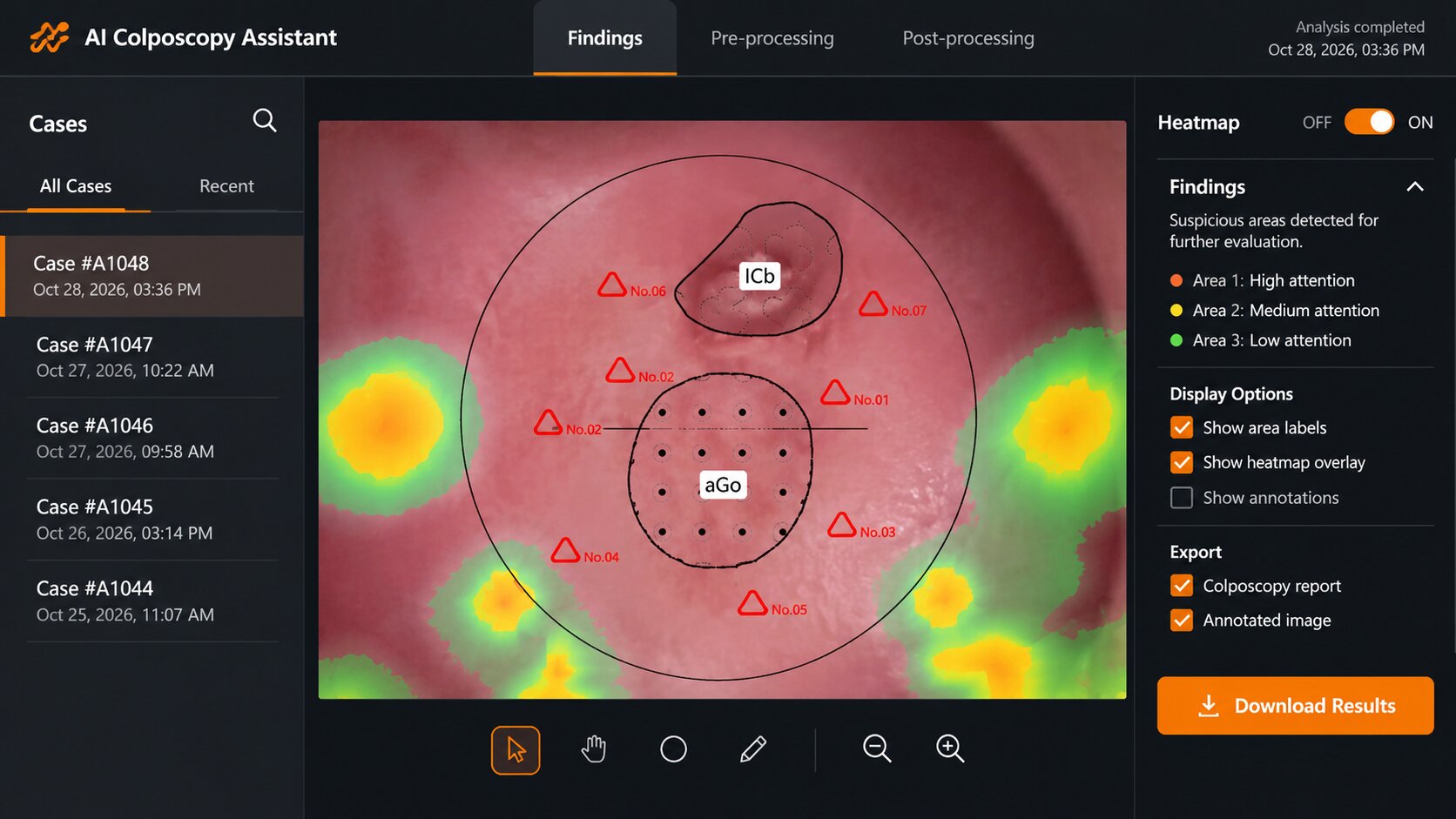
The system works as a short sequence: capture the images, select the ones worth keeping, and paint on them to mark the areas of interest. Each step has its own screen, and the same image travels from one to the next. That journey is harder than it sounds, because the screens do not show the image at the same proportions.
A clinician who zooms in and moves the image on the paint screen expects to find exactly that view again on the result screen. Carrying those zoom and pan settings across screens means allowing for the difference in aspect ratio between them, otherwise the picture on one screen no longer matches the picture that was captured.
The selection screen added another dependency. It can overlay a heatmap on each image, and anything that changes how an image is displayed has the potential to change how that overlay sits on top of it. In a tool used for diagnosis, a display that looks almost right is not good enough.
PROJECT OBJECTIVE
The customer wanted new and changed functions added to its colposcopy support system, with images that look the same wherever they appear, heatmaps that stay aligned with the images beneath them, and changes made by a team that could show what each change touches.
APPROACH AND METHODOLOGY
Working from high level requirements to written designs
Our team worked closely with the customer to clarify and confirm requirements. Starting from the customer's high level requirements, we wrote the database design and the API specification and had both confirmed, so that the shape of each change was agreed before it was built.
Reviewing the zoom behavior at its source
For the display issues, our team went back to the zoom library in use and checked how it behaved, then adjusted the handling so that zoom and movement on one screen map to the customer's expectation on every other.
Making impact a standing question
Since a change to how images are displayed can reach other screens, we wrote a checklist that reminds every developer to ask the same questions before and after a change, and our developers went through the places where the display logic runs and the features connected to them. The checklist gives the whole team one shared habit instead of leaving it to individual memory.
Keeping communication light and regular
Slack connected our team with the customer, Skype handled conversation within our own team, and a weekly video meeting gave everyone a fixed time to review progress and raise questions.
TEAM SCALE
Our team was small and technical, with a development lead guiding two backend engineers, supported by two testers from our software testing practice.
- Development lead: set the technical direction and brought a strong frontend background, including how to make screens feel smooth
- Backend engineers: designed and reviewed the services and API versions behind the screens
- Testers: kept checklists current, tracked quality, and proposed improvements to testing
THE SOLUTION AND TECHNOLOGY STACK
The work sits where artificial intelligence meets everyday clinical use, an area we support through our computer vision practice.
The review sequence
- Capture: brings images into the system from the examination
- Select: shows the captured images before and after processing, lets the user choose which to paint on or discard, and offers a switch that turns the heatmap overlay on or off
- Paint: lets the user align the image to a guide circle, then mark areas of interest, with tools for the center point, drawing, and biopsy marks
- Result: shows the marked image with the same zoom and position the user chose
What our team changed and added
- Consistent zoom and movement: zoom and pan settings carry over between the paint and result screens in a way that allows for their different proportions
- Stable heatmap display: the heatmap on the selection screen stays aligned when display settings change
- New and revised functions: additional and changed features for the diagnostic support system, built and tested end to end
Technology Stack
Layer | Technology / Platform Used |
Platform | Windows 10 and 11 tablets |
Languages | JavaScript, Python |
Frontend framework | Vue |
Collaboration | Slack, Skype, weekly video meetings |
THE RESULTS
- Images that match from screen to screen: zoom and position chosen on one screen are reflected faithfully on the next.
- A heatmap that stays where it belongs: overlay display on the selection screen is protected when display settings change.
- A team that asks what a change touches: an impact checklist gives every developer the same questions to answer before a change is accepted.
- Features delivered and tested end to end: new and revised functions were coded and covered by unit and integration testing.
In a diagnostic tool, trust comes from details like these being right every time, and that is the standard the team worked to.
Có thể bạn quan tâm
-

A specialized healthcare recruitment portal puts clinics and candidates in direct conversation
-
Japanese healthtech leader enables 100% offline-ready biometric screening on cross-platform medical terminals
-

How a seamless Rails modernization enabled automated cloud scheduling and multi account AWS protection
-
Multi store luxury watch retailers safeguard repair agreements and customer trust through integrated LINE chat
-
A multi portal recruitment platform syncs nationwide job postings across nine external boards
-

Interactive polygon maps and connected IoT sensors modernize daily operations across regional farms
-

Containerized microservices on AWS Fargate keep high traffic hotel check in and rewards fully reliable
-
Real time gesture controls and facial tracking give virtual creators seamless avatar performance
-

A custom React frontend brings dense macroeconomic datasets to life alongside the client API team

Năng lực liên quan
Kết nối với chúng tôi
Biến mục tiêu thành kết quả?
Chúng tôi sẵn sàng đồng hành cùng doanh nghiệp.